
Now that the Galaxy S26 series has landed, what’s your favorite new feature?
Galaxy S26 Series: Samsung’s Latest Flagship Lineup Breaks New Ground in Mobile Technology
Unprecedented Success Marks Strong Start for Samsung’s Newest Flagships
Just weeks after hitting store shelves on March 11th, Samsung’s Galaxy S26 series is already making waves in the smartphone market. The South Korean tech giant reports that preorders for the new lineup have exceeded those of the previous S25 generation, signaling strong consumer enthusiasm for the latest innovations. While the entire series is performing well, the premium Galaxy S26 Ultra has emerged as a particular standout, commanding attention despite its premium price point.
With hands-on reviews now published and users getting their first extended experiences with the devices, the tech community is buzzing about the standout features that Samsung has packed into these new flagships. While not every feature represents a complete overhaul, Samsung has significantly enhanced several existing capabilities, making them feel fresh and innovative.
Privacy Display: A Game-Changer for Screen Security
Perhaps the most talked-about feature of the Galaxy S26 series is the revolutionary Privacy Display, which has become central to Samsung’s marketing campaign. This cutting-edge technology addresses a common modern concern: the ability for others to see what’s on your screen in public spaces.
The Privacy Display works by selectively deactivating pixels that project light at wider angles, while maintaining full visibility for pixels that project light directly forward. The result? You can view your screen with perfect clarity while those around you see only a darkened display. It’s like having built-in privacy screen technology without the additional cost or hassle of applying physical screen protectors.
What makes this feature particularly impressive is its customizability. Users can configure the Privacy Display to activate automatically when opening specific apps, when notifications appear, or manually toggle it on demand. Whether you’re checking sensitive work emails on a crowded train or entering passwords in a coffee shop, this feature provides peace of mind.
Unfortunately, this technology is currently exclusive to the Galaxy S26 Ultra, making it a compelling reason to opt for Samsung’s top-tier model. The engineering required to implement this feature without compromising display quality or battery life represents a significant technological achievement.
Gemini Screen Automation: Your Personal Digital Assistant Gets Smarter
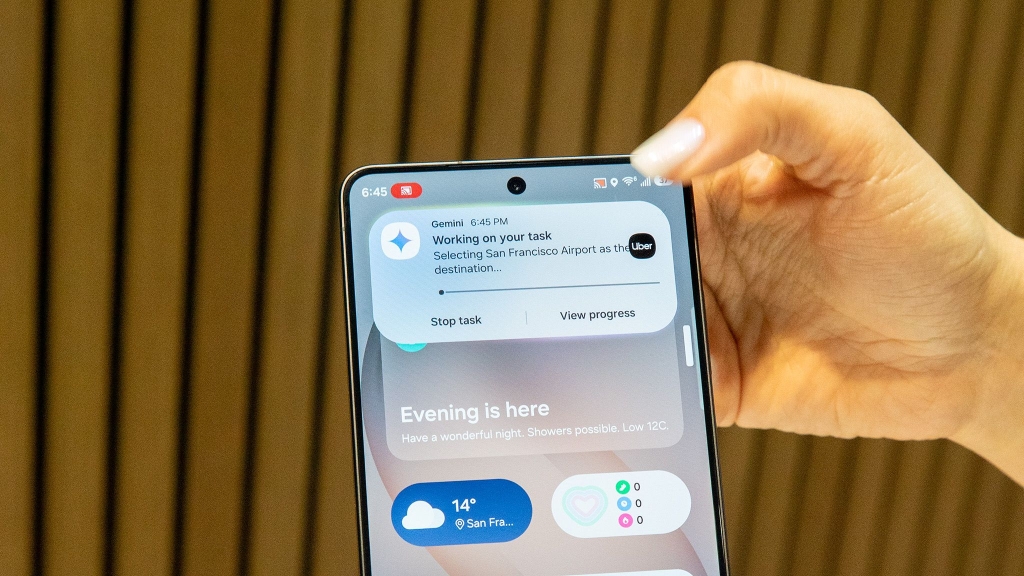
Google’s Gemini AI has received a substantial upgrade on the Galaxy S26 series through the introduction of screen automation capabilities. This feature transforms Gemini from a simple question-and-answer assistant into a proactive digital helper that can actually perform tasks on your behalf.
Screen automation allows Gemini to open apps, navigate interfaces, and complete multi-step processes just by following your verbal instructions. Need to order dinner? Simply tell Gemini what you want, and it will launch the appropriate delivery app, browse the menu, select your items, and proceed to checkout. The system even pauses when it needs clarification, such as asking about specific preferences or sizes.
During our testing, we were impressed by Gemini’s ability to handle real-world tasks with surprising competence. When ordering coffee, it correctly interpreted preferences for milk type, size, and add-ons. When food delivery was requested, it navigated restaurant menus and selected appropriate options based on previous ordering history.
While the technology is still maturing and app support remains somewhat limited, the potential is enormous. Samsung has indicated that this feature will likely roll out to other Android devices, including the upcoming Pixel 10 series, suggesting that screen automation could become a standard feature across the Android ecosystem.
Photo Assist Gets a Major Upgrade
Samsung’s photo editing capabilities have received a significant boost with the enhanced Photo Assist feature. Building on existing AI-powered editing tools, the new version allows users to make complex edits using natural language commands.
Want to remove an unwanted object from a photo? Just tell Photo Assist to “remove the person in the background” or “fix the lighting in this portrait.” The system understands context and can make intelligent adjustments accordingly. One particularly impressive capability allows users to add elements from one image into another, such as superimposing clothing items onto a model or adding objects to a scene.
This functionality works similarly to Google’s Help Me Edit feature in Google Photos, which is also available on Galaxy S26 devices. The competition between these AI editing tools is pushing the boundaries of what’s possible in mobile photography.
Nudge: Proactive Intelligence at Your Fingertips
Samsung’s answer to Google’s Magic Cue feature, Nudge represents a shift toward more proactive AI assistance. Rather than waiting for users to search for information, Nudge anticipates needs based on contextual cues and surfaces relevant content automatically.
The feature can identify dates in messages and suggest calendar events, recognize phone numbers and offer to save them to contacts, or surface relevant photos based on conversations or locations. It’s like having a personal assistant who’s always one step ahead, preparing information before you even realize you need it.
This kind of anticipatory computing represents the future of mobile AI, where devices become increasingly helpful without requiring explicit commands. The more you use Nudge, the better it becomes at predicting your needs and surfacing useful information at the right moment.
Bixby Gets a Natural Language Makeover
Samsung’s virtual assistant, Bixby, has also received significant improvements in natural language processing. The updated version can understand more conversational commands and provide more contextually appropriate responses.
For example, if you tell Bixby “my eyes are tired from looking at this screen,” it might suggest enabling Eye Comfort Shield, a blue light filtering feature. This represents a shift from rigid command structures to more natural, human-like interactions with your device.
Bixby can now help navigate phone settings and features more effectively, making it easier to discover and utilize the full capabilities of your Galaxy S26 device. The improved contextual understanding means Bixby can provide more relevant suggestions and complete more complex tasks based on conversational input.
Enhanced Call Screening and Document Scan
The Galaxy S26 series introduces improved call screening capabilities that can help filter unwanted calls and provide more information about incoming callers. The system can now generate more accurate transcriptions of voicemail messages and provide better context about why someone might be calling.
Document Scan has also been enhanced, offering better OCR (optical character recognition) accuracy and more intelligent document formatting. Whether you’re scanning a business card, receipt, or multi-page document, the new system produces cleaner, more usable digital copies.
Ocean Mode Photography: Capturing the Depths
Photography enthusiasts will appreciate Ocean Mode, a specialized camera setting designed for underwater and beach photography. This mode optimizes camera settings for the unique lighting conditions and color distortions that occur in aquatic environments, helping capture more vibrant, accurate photos when near or in water.
The feature demonstrates Samsung’s commitment to expanding mobile photography capabilities beyond traditional scenarios, acknowledging that many users want to capture memories in diverse environments without carrying specialized equipment.
DeX Evolution: Desktop Experience Reimagined
Samsung’s DeX feature, which allows Galaxy devices to function as desktop computers when connected to monitors, has received substantial upgrades. The new version offers improved multitasking capabilities, better window management, and enhanced compatibility with desktop applications.
Users can now run multiple Android apps simultaneously in resizable windows, connect to multiple displays, and enjoy a more seamless transition between mobile and desktop modes. The enhanced DeX experience makes the Galaxy S26 series even more versatile for productivity-focused users who need desktop-class functionality on the go.
Audio Eraser: Silence the Noise
The upgraded Audio Eraser feature provides advanced audio editing capabilities that can remove unwanted sounds from video recordings. Whether it’s background chatter, wind noise, or traffic sounds, Audio Eraser can identify and reduce specific audio frequencies while preserving the primary sound you want to keep.
This tool is particularly valuable for content creators who record video on their phones, as it can dramatically improve audio quality without requiring external microphones or post-production software.
Looking Ahead
The Galaxy S26 series represents Samsung’s most ambitious flagship lineup to date, with AI integration touching nearly every aspect of the user experience. From enhanced privacy features to proactive assistance and advanced photography capabilities, these devices showcase how artificial intelligence is transforming mobile technology.
As users continue to explore these new features and provide feedback, we can expect Samsung to refine and expand capabilities through software updates. The strong preorder numbers suggest that consumers are ready for this next generation of AI-enhanced mobile experiences.
Whether you’re a tech enthusiast eager to explore cutting-edge features or a practical user looking for a reliable, capable device, the Galaxy S26 series offers something compelling. The question isn’t whether these phones are impressive—it’s which features will prove most valuable in your daily life.
Tags: Galaxy S26, Samsung flagship, Privacy Display, Gemini AI, screen automation, Photo Assist, Nudge feature, Bixby upgrade, DeX enhancement, Ocean Mode, Audio Eraser, smartphone innovation, mobile AI, flagship features, tech review
Viral Phrases: “Privacy Display technology changes everything,” “Gemini screen automation is mind-blowing,” “Samsung’s AI revolution is here,” “The future of mobile is now,” “Galaxy S26 Ultra steals the show,” “AI that actually helps you,” “Your phone just got smarter,” “Privacy in your pocket,” “Mobile photography redefined,” “Desktop power in your hand”
,

Leave a Reply
Want to join the discussion?Feel free to contribute!