
Outlook’s new AI salvages your calendar
Microsoft Supercharges Outlook with AI: Automated Meeting Scheduling and Smart Email Drafting Arrive
In a bold move that could redefine workplace productivity, Microsoft has unveiled a suite of AI-powered enhancements for Outlook, its flagship email and calendar application. These updates, part of a broader push to integrate artificial intelligence across its business apps, promise to automate the tedious aspects of email and meeting management—freeing up professionals to focus on what truly matters.
AI-Powered Email Drafting and Editing
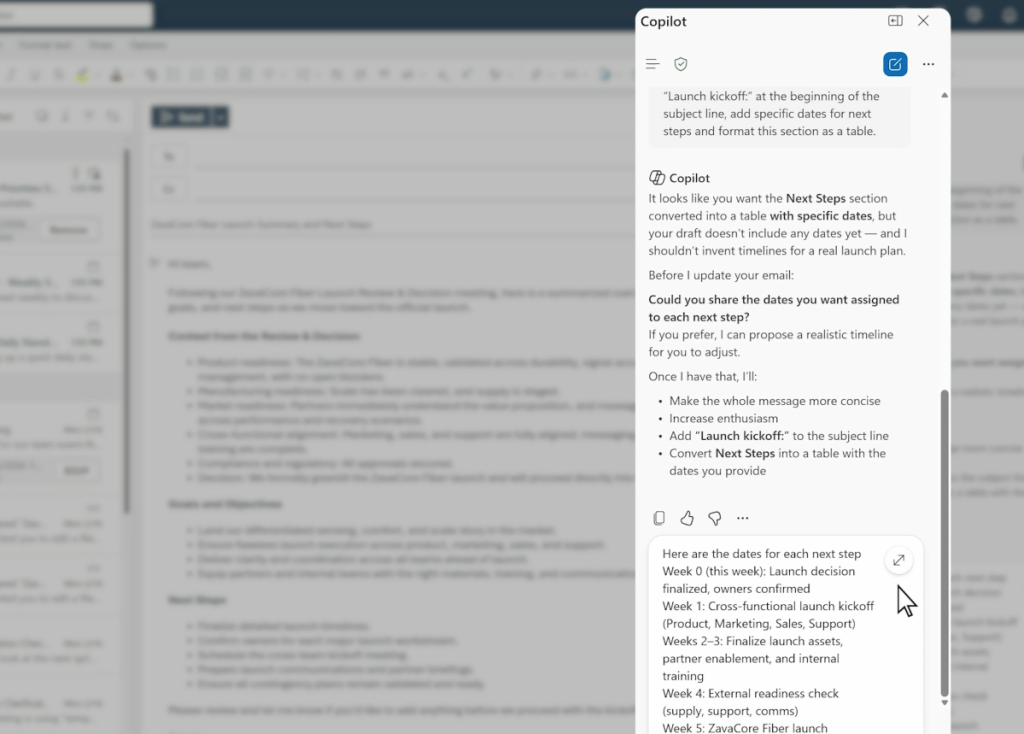
Outlook is now rolling out a new feature that allows users to draft emails directly within the app, with Copilot—Microsoft’s AI assistant—collaboratively editing the message in real time. Whether it’s refining the tone, ensuring all necessary information is included, or simply polishing the language, Copilot acts as a virtual writing partner. This feature is available in the “modern Outlook” experience on Windows, the web, and mobile apps, as well as within Copilot Chat.
For those who have long relied on AI for drafting documents in Word or creating presentations in PowerPoint, this marks a significant expansion of AI’s role in everyday communication. The ability to generate and refine emails on the fly could save professionals countless hours each week.
Automated Meeting Management: The End of Calendar Chaos?
One of the most exciting announcements is Outlook’s new AI-driven meeting preferences. Users can now set rules for how the app handles calendar invitations—automatically accepting meetings from your manager if you’re free, declining “office hours” invites, or removing canceled events. This automation could be a game-changer for anyone drowning in a sea of meeting requests.
But Microsoft didn’t stop there. In Copilot Chat, users can now ask the AI to schedule meetings on their behalf. Simply prompt: “Schedule 30 minutes with /name, /name, and /name next week to decide on the launch plan for Project X. Book a room and include an agenda.” Copilot will then check your calendar, propose times, and even show you a visual preview of how each option fits into your schedule. This feature is available now for Microsoft 365 and Outlook endpoints, meaning it’s ready to use inside Outlook itself—no need to open a separate chat window.
Expanding AI Horizons: From OpenAI to Claude
In a notable shift, Microsoft is diversifying its AI model lineup. While Copilot has long relied on OpenAI’s technology, the company is now integrating models from Anthropic’s Claude into Word, PowerPoint, and Excel. This move could bring new capabilities and perspectives to these core productivity tools, potentially offering users more nuanced and context-aware assistance.
The Human Touch: Trust and Flexibility Remain Key
While these AI features promise to streamline workflows, they also raise questions about trust and flexibility. Can you rely on AI to make the right call on meeting scheduling, especially when logistics and priorities are in flux? Will automated email drafting capture your unique voice and intent? Microsoft is betting that users will be willing to experiment and adapt, but the real test will be in everyday use.
Looking Ahead
As AI continues to weave itself into the fabric of workplace tools, the line between human and machine productivity is blurring. Microsoft’s latest updates to Outlook represent a significant step toward a future where managing your inbox and calendar is as simple as having a conversation with an intelligent assistant. Whether these features live up to their promise remains to be seen, but one thing is clear: the era of AI-powered productivity is here, and it’s arriving faster than ever.
Tags: Microsoft, Outlook, AI, Copilot, email automation, meeting scheduling, productivity, Anthropic Claude, OpenAI, workplace tech, calendar management, viral tech news
Viral Phrases: “AI-powered productivity revolution,” “Outlook gets a brain upgrade,” “Say goodbye to email overload,” “Meetings managed by AI—welcome to the future,” “Copilot now your personal assistant,” “Automate your workday with Microsoft’s latest AI,” “The end of calendar chaos,” “Draft emails in seconds with AI,” “Microsoft bets big on AI for business,” “Your inbox just got smarter”
,


Leave a Reply
Want to join the discussion?Feel free to contribute!