
Pixel Weather tweaks widget, new icons come to Google Clock 8.6
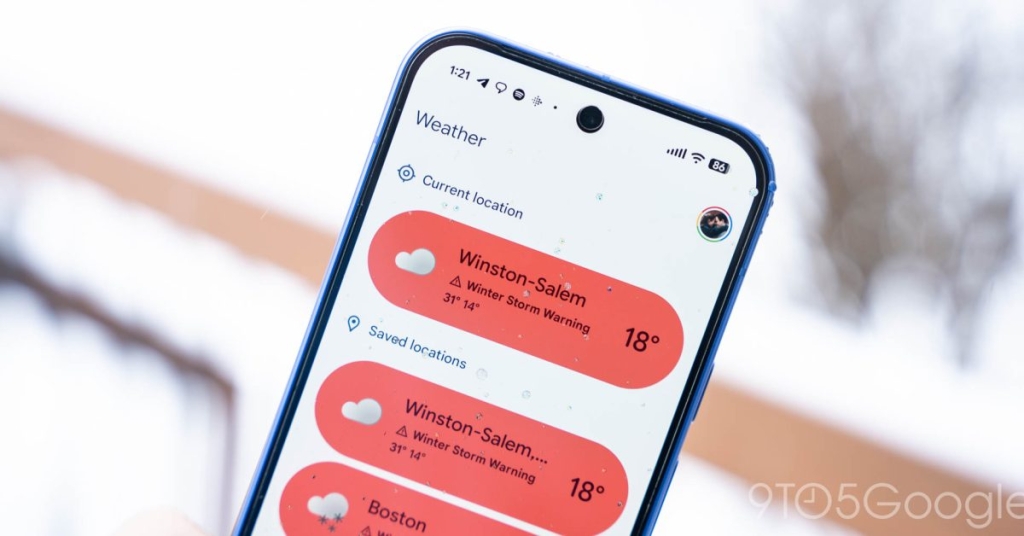
Google Just Made Pixel Weather and Clock WAY Better – Here’s What’s New
In a move that’s sending ripples through the Android community, Google has quietly rolled out a pair of subtle yet significant updates to two of its most-used Pixel apps: Pixel Weather and Google Clock. While these changes might seem minor at first glance, they represent Google’s ongoing commitment to refining the user experience across its ecosystem.
Pixel Weather Gets a Visual Refresh
The latest update to Pixel Weather (version 1.2.20251230.x) brings more than just bug fixes. Google has implemented thoughtful sizing tweaks to the popular “Forecasted weather” widget that dramatically improve readability. The most noticeable change? Increased padding throughout the interface.
For those who rely on the 5×3 widget layout, you’ll immediately notice the removal of that pesky bottom line that previously displayed tomorrow’s forecast. The 5×4 and 5×5 variants have also been streamlined, now showing two and four days respectively instead of three and five. While this means slightly less information density, the trade-off is a cleaner, more polished interface that eliminates visual clutter.
These changes address long-standing user complaints about the widget’s cramped feel, particularly on devices with larger displays where the increased padding creates a more balanced visual hierarchy.
Clock App Joins the Colorful Revolution
Meanwhile, Google Clock (version 8.6) is getting a splash of color that users never saw coming. The app is adopting the vibrant new icon set that debuted in Pixel Weather, marking a complete reversal from the monochrome design Google implemented just last June.
The World Clock feature, in particular, benefits from this colorful makeover. Gone are the days of bland, indistinguishable icons – each location now sports its own distinctive, eye-catching design. This change isn’t just cosmetic; it significantly improves usability by making it easier to quickly identify different time zones at a glance.
This update is rolling out gradually through the Play Store, so don’t panic if you haven’t seen it yet. As with Pixel Weather, this feature remains exclusive to Pixel devices, maintaining Google’s strategy of offering unique software experiences to its hardware customers.
The Bigger Picture
These updates reflect Google’s maturing approach to Pixel software. Rather than dramatic overhauls, we’re seeing a focus on refinement and attention to detail. The company is clearly listening to user feedback and making incremental improvements that add up to a noticeably better experience.
The timing is also interesting. With competitors constantly evolving their weather and clock applications, Google seems determined to ensure Pixel users feel they’re getting something special that can’t be found on other Android devices.
What’s Next?
While Google Calculator also received a minor update (version 9.1), there don’t appear to be any visible changes – perhaps a foundation for future features? As always, these updates roll out gradually, so give it a few days if you haven’t received them yet.
For Pixel owners, these subtle improvements represent the kind of thoughtful polish that makes the Android experience feel premium. Sometimes, it’s the little things that matter most.
viral tags: Pixel Weather update, Google Clock redesign, Android weather app, Pixel exclusive features, Google app updates 2025, weather widget redesign, colorful clock icons, Pixel software improvements, Android customization, Google ecosystem
viral phrases: “game-changing update,” “you won’t believe,” “hidden features,” “Android revolution,” “Pixel owners rejoice,” “Google’s secret weapon,” “the little details that matter,” “exclusive to Pixel,” “rolling out now,” “attention to detail”
,

Leave a Reply
Want to join the discussion?Feel free to contribute!