
PSA: You can adjust your mouse sensitivity in Resident Evil Requiem, but the setting’s not in an obvious place
Breaking News: Resident Evil Requiem’s PC Settings Hide a Surprising Secret—Here’s What You Need to Know!
In a shocking twist that has left PC gamers scratching their heads, Capcom’s latest survival horror masterpiece, Resident Evil Requiem, has a hidden setting that’s causing quite the stir. While the game has been praised for its spine-chilling atmosphere and intense gameplay, it seems the PC version has a little secret buried in its options menu that even the most eagle-eyed players might have missed.
The Setting That’s Got Everyone Talking
Resident Evil Requiem encourages players to experience the game in two distinct ways: Grace’s sections in first-person for maximum immersion and Leon’s over-the-shoulder perspective for that classic Resident Evil feel. But here’s the kicker—if you’re playing on PC, you might have found yourself stuck with a sluggish mouse sensitivity that feels like you’re dragging your cursor through molasses. And no, it’s not a bug. It’s a feature… sort of.
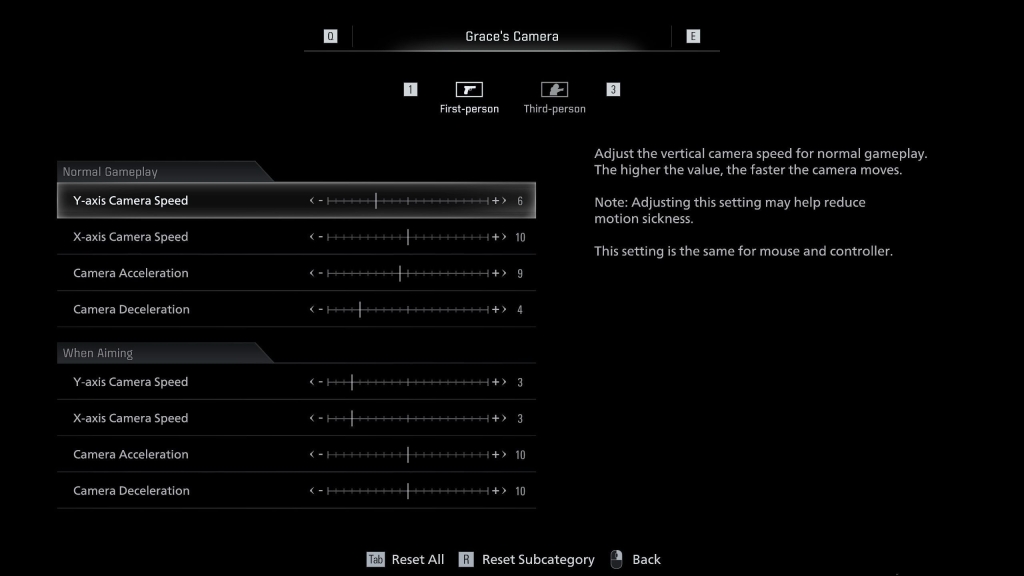
Capcom had to step in post-release to clarify that mouse sensitivity settings for each character can be adjusted, but here’s the catch: they’re hidden in the most unexpected place. Instead of being under the obvious “Keyboard and Mouse” section in the Controls submenu, you’ll find them under the Camera settings. And even then, it’s not as straightforward as you’d hope. Next to the toggle for first- and third-person perspectives, there’s a tiny icon that leads to a secondary menu where you’ll finally find the sliders for camera speed and acceleration.
The FOV Slider That’s Nowhere to Be Found
But wait, there’s more. If you’re hoping for a field-of-view (FOV) slider, you’re out of luck. This is a surprising step back from the Resident Evil 4 remake, which included this highly requested feature. For a game that’s pushing the boundaries of horror and immersion, the lack of an FOV slider feels like a missed opportunity. And if you’re rocking a less-than-standard resolution like 2560×1600, you might find that Resident Evil Requiem doesn’t support your setup out of the box. Yikes.
The Community’s Reaction
The PC gaming community has been vocal about these oversights, with many taking to forums and social media to share their frustrations. Some have even resorted to third-party tools like REFramework to tweak their settings and get the game running the way they want. While these workarounds are helpful, they shouldn’t be necessary for a AAA title in 2023.
Why This Matters
For a game that’s all about immersion and tension, having clunky controls or limited customization options can break the experience. Whether you’re sneaking through dark corridors as Grace or facing off against hordes of enemies as Leon, the last thing you want is to be distracted by technical hiccups. Capcom has a reputation for delivering polished experiences, so it’s disappointing to see these oversights in Resident Evil Requiem.
The Bottom Line
Resident Evil Requiem is still a must-play for fans of the genre, but PC players should be prepared for a bit of a learning curve when it comes to the settings. If you’re diving into the game, take a moment to explore the Camera menu and adjust those sensitivity sliders—it’ll make a world of difference. And if you’re hoping for an FOV slider or broader resolution support, you might want to keep an eye out for future updates or community mods.
Viral Tags and Phrases:
-
ResidentEvilRequiem
-
CapcomSecrets
-
PCGamingStruggles
-
HiddenSettings
-
MouseSensitivityMystery
-
FOVSliderMissing
-
REFrameworkToTheRescue
-
SurvivalHorrorMasterpiece
-
GamingCommunityReactions
-
TechTroublesInRE
Stay tuned for more updates on Resident Evil Requiem and other gaming news. And remember, in the world of PC gaming, sometimes the real horror is in the settings menu. 🎮👻
,

Leave a Reply
Want to join the discussion?Feel free to contribute!