
Razer Huntsman V3 Pro 8KHz Review: A Keyboard for the Competitive
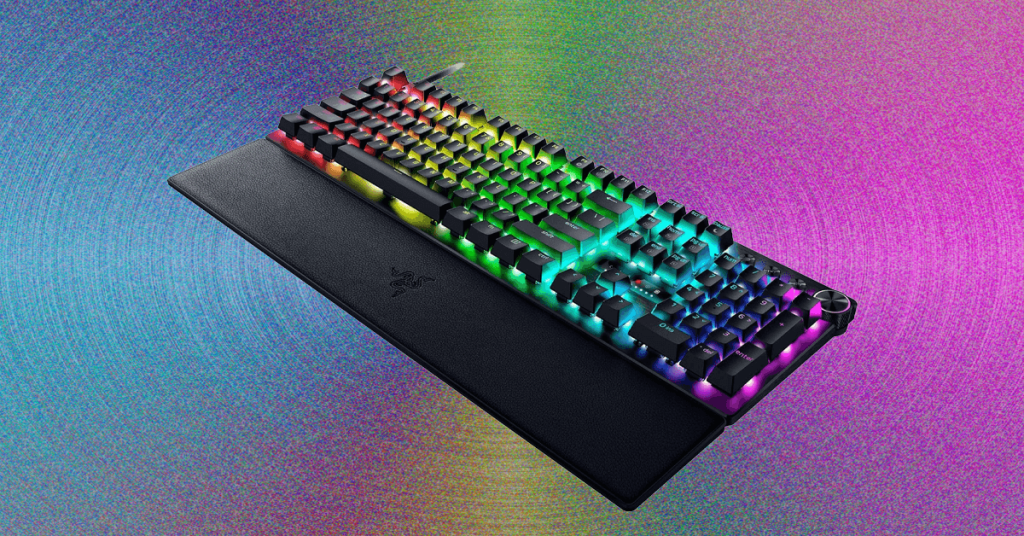
Razer Huntsman V3 Pro: The Keyboard That’s More Than Just Pretty Lights
The Razer Huntsman V3 Pro has arrived, and it’s packing some serious tech that goes far beyond your average gaming keyboard. While many gaming keyboards these days boast flashy OLED displays and RGB lighting galore, Razer has taken a different approach with their latest mechanical marvel.
The Right-Side Screen: Convenience Meets Innovation
Let’s start with what might be the most talked-about feature: the screen on the right side of the keyboard. This isn’t just another pretty face—it’s actually incredibly practical. The screen serves as an actuation visualizer, displaying a line of dots that illuminate from left to right as you press down on a key. This visual feedback is more than just eye candy; it’s a tool that helps you dial in your perfect actuation distance.
For those unfamiliar with the term, actuation distance refers to how far you need to press a key before it registers your input. With this visualizer, you can literally see exactly when your keypress is being detected, allowing for incredibly precise adjustments. It’s like having a built-in training tool that helps you optimize your typing or gaming performance.
But here’s the thing—while this feature is genuinely useful for setup and calibration, once you’ve found your sweet spot, it becomes more of a visual novelty. The illumination is undeniably cool to look at, but most users will likely find themselves focusing on their screen rather than watching their keyboard lights dance.
Profile Management: Power at Your Fingertips
One of the most clever design choices on the Huntsman V3 Pro is how Razer repurposed that cluster of rarely-used keys above the arrow keys. Now, when you hold down the Function key, these keys become your profile selectors, allowing you to switch between five different preset profiles on the fly.
This is where things get really interesting. Four of these profiles are completely customizable, giving you the freedom to create different setups for different games or applications. Maybe you want ultra-fast response times for competitive shooters, or perhaps you prefer a more deliberate feel for typing and productivity work. The choice is yours.
The first profile, labeled “Factory Default,” serves as a crucial safety net. Think of it as your keyboard’s emergency brake. If you accidentally remap something important—like turning your space bar into your controller’s “A” button (yes, the software will actually warn you if you try this)—you can always fall back to this default profile to get things back to normal.
Hall Effect Switches: The Science Behind the Speed
The real magic of the Huntsman V3 Pro lies in its Hall effect switches. For those who aren’t keyboard enthusiasts, Hall effect technology uses magnetic fields to detect key presses, offering several advantages over traditional mechanical switches.
First, these switches are incredibly durable. Since there’s no physical contact between components, there’s less wear and tear over time. Second, they offer unparalleled consistency—the magnetic field detection means your keypresses will feel the same whether it’s day one or year three.
But where Hall effect really shines is in the customization options. Each individual key can have its actuation distance adjusted, allowing for a truly personalized typing experience. Some users might prefer light, hair-trigger keys for gaming, while others might want a deeper press for typing accuracy.
Rapid Trigger and SOCD: Gaming Features That Actually Matter
The Rapid Trigger feature is a game-changer for competitive gamers. Traditional keyboards require you to fully release a key before pressing it again, but Rapid Trigger changes the game by allowing you to set a custom reset point. This means you can press the same key multiple times in rapid succession without waiting for it to fully return to its starting position.
Razer’s implementation, called Snap Tap, handles Simultaneous Opposing Cardinal Direction (SOCD) inputs in a way that feels natural and responsive. For those unfamiliar with SOCD, it’s a common issue in gaming where pressing opposing directions (like left and right) can cause conflicts. Snap Tap elegantly resolves these conflicts, making for smoother movement in games.
The Nitty-Gritty: Advanced Customization Options
For the true keyboard enthusiasts, Synapse (Razer’s configuration software) offers even more granular control. You can adjust switch dead zones, which determines how much of the key press is ignored at the beginning of the stroke. This is particularly useful for eliminating accidental keypresses.
The rapid trigger sensitivity adjustment allows you to fine-tune exactly how responsive you want the Rapid Trigger feature to be. And for those who want to push things to the absolute limit, the Continuous Rapid Trigger option keeps the feature active even above the default actuation point, as long as the key hasn’t been fully released.
The RGB Lighting Saga: When Pretty Lights Go Wrong
Now, here’s where things get a bit complicated. During my testing period, I encountered some significant issues with the RGB lighting system. The lighting would frequently stop working entirely during use, requiring a full keyboard reset by unplugging it. At one point, the main RGB layer completely failed, leaving only the OLED display and the Function layer illumination functional.
The most perplexing issue was that the RGB lighting would mysteriously return to default settings whenever my computer was locked. This strongly suggested there was some kind of conflict or bug within the Synapse software itself.
After extensive troubleshooting—including multiple reinstallations of both Synapse and Chroma (Razer’s RGB control software)—I was finally able to get the lighting working consistently again. However, this experience highlighted some stability issues that Razer will likely need to address through software updates.
The Verdict: A Keyboard With Tremendous Potential
The Razer Huntsman V3 Pro is a keyboard that pushes boundaries and introduces genuinely useful innovations. The Hall effect switches offer a level of customization that traditional mechanical keyboards simply can’t match, and features like the actuation visualizer and profile switching make it incredibly versatile.
However, the software stability issues are a significant concern, especially considering the premium price point of this keyboard. When you’re investing in a high-end gaming peripheral, you expect everything to work flawlessly out of the box.
Despite these hiccups, the core technology and features of the Huntsman V3 Pro are impressive enough that it’s still worth considering for serious gamers and keyboard enthusiasts who value customization and performance above all else.
Tags: Razer Huntsman V3 Pro, Hall effect switches, gaming keyboard, mechanical keyboard, RGB lighting, actuation distance, Rapid Trigger, SOCD, Synapse software, keyboard customization, competitive gaming, magnetic switches, keyboard technology, premium gaming peripherals, keyboard review
Viral Sentences:
- “The screen that watches you type: Razer’s latest keyboard innovation”
- “Magnetic magic: How Hall effect switches are changing gaming forever”
- “When your keyboard has more bugs than your code: The RGB lighting nightmare”
- “Press once, press twice, press a thousand times: The future of keyboard actuation”
- “From space bar to ‘A’ button: When keyboard customization goes too far”
- “The keyboard that learns your typing style better than you do”
- “RGB lighting that resets itself? Razer’s software mystery deepens”
- “Why serious gamers are switching to magnetic switches”
- “The $200 keyboard that might drive you crazy before it impresses you”
- “Actuation visualizer: The feature you didn’t know you needed until now”
,

Leave a Reply
Want to join the discussion?Feel free to contribute!