
Run Canva Affinity on Ubuntu using this Unofficial AppImage
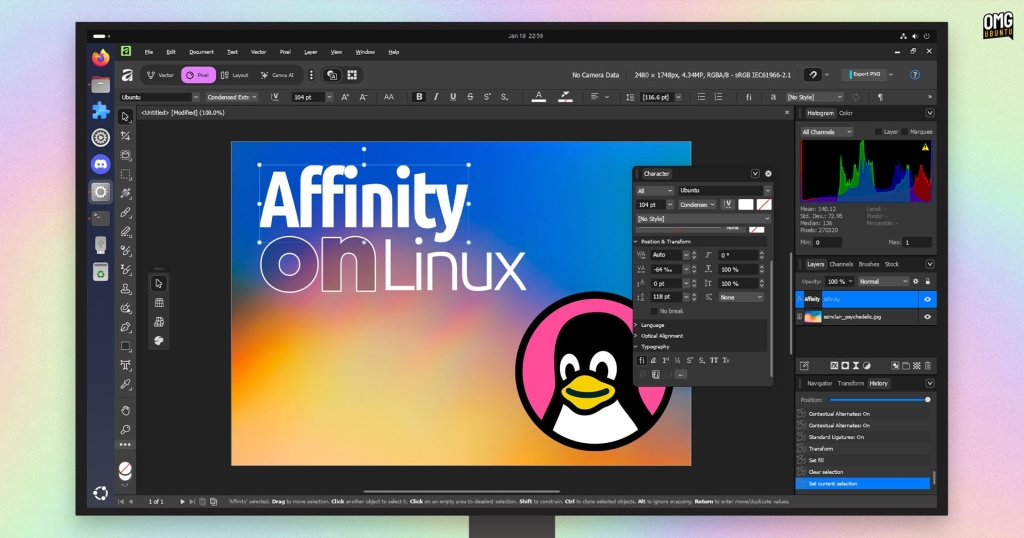
Canva’s Affinity Creative Suite Lands on Linux: Community-Led Breakthrough Delivers Adobe-Level Tools Without the Adobe Price Tag
The Linux desktop has long suffered from a glaring creative void: the absence of professional-grade design software that creative professionals rely on daily. Adobe’s Creative Cloud remains Windows and macOS exclusive, leaving Linux users to either dual-boot, virtualize, or settle for open-source alternatives that, while capable, demand significant workflow adaptation.
But 2025 marks a turning point. Canva’s acquisition of Affinity in 2024 has transformed the landscape, with the creative suite—formerly priced at premium rates—now available as a unified freemium application across Windows and macOS. The catch? Linux remains conspicuously absent from the official support list, despite the Affinity team acknowledging user demand for native support.
Enter the Linux community’s ingenious solution: AffinityOnLinux, a grassroots project that has cracked the code on running Affinity’s full creative suite on Linux systems through Wine compatibility.
The Community Hack That Changes Everything
The Linux Affinity Installer project, spearheaded by developer ryzendew, has created two distinct pathways for Linux users to access Affinity’s powerful tools:
- Traditional Wine installation: Leverages your system’s existing Wine installation with custom tweaks and dependencies
- Revolutionary AppImage package: A self-contained solution bundling everything needed to run Affinity seamlessly
The AppImage approach proves particularly compelling for Linux users seeking simplicity. This 1.2GB package includes a pre-configured Wine 10.x environment, the Windows version of Affinity 3.0.2, and all necessary dependencies—essentially creating a portable Affinity installation that “just works” across most Linux distributions.
Real-World Performance: From Basic Edits to Complex Projects
Testing on a modest Ubuntu 24.04 LTS system revealed impressive capabilities. Basic raster editing in Pixel mode operated smoothly, with all tools, dialogs, filters, and effects functioning as expected. The interface remained responsive during standard image manipulation tasks.
However, performance limitations emerged when pushing the system with complex Photoshop (.PSD) files containing multiple layers, style effects, smart objects, masks, and nested effect groups. The system began to struggle, likely due to hardware constraints rather than software limitations—a common challenge when running Windows applications through compatibility layers.
Technical Trade-offs Worth Understanding
The AppImage solution, while remarkably convenient, comes with specific limitations that users should consider:
Canva Account Integration: Users cannot sign into their Canva accounts through the Linux version. More critically, clicking “Sign Out” renders the application unusable, as re-authentication isn’t possible.
WebView2 Rendering Issues: Interface elements relying on Microsoft’s WebView2 technology—including the built-in help system and welcome screen with downloadable templates—experience rendering problems.
Graphics Acceleration Architecture: The AppImage employs DXVK for graphics acceleration but lacks OpenCL support. This means computationally intensive filters and effects default to CPU processing rather than GPU acceleration.
Hardware-Specific Considerations: Intel iGPU users may encounter OpenCL bugs, though DXVK generally provides smooth rendering where supported. NVIDIA dGPU users requiring OpenCL must opt for the traditional installation method instead.
Installation: Simpler Than You Think
The AppImage experience exemplifies Linux’s “just works” philosophy. After downloading the package and marking it executable (right-click → Properties → Permissions → Allow executing file as program), users can launch Affinity immediately. No complex Wine configuration, no dependency hunting, no log file troubleshooting.
The package automatically creates approximately 3GB of additional files and folders during first launch, so users should ensure adequate disk space. The solution supports only 64-bit Intel/AMD architectures—ARM compatibility remains unavailable due to reliance on the official Windows installer.
Configuration and Customization
First-time users encounter a DPI scaling slider to optimize interface display for their display resolution. Advanced users can access Wine configuration settings by launching the AppImage with the --winecfg command-line parameter, providing deeper control over the compatibility environment.
The project maintains comprehensive documentation of known issues and troubleshooting procedures through its GitHub repository, ensuring users can resolve common problems independently.
The Bigger Picture: Commercial Software’s Linux Future
This community-driven achievement raises compelling questions about Linux’s creative software ecosystem. While AffinityOnLinux demonstrates that commercial applications can successfully run on Linux through compatibility layers, it also highlights the ongoing tension between official support and community workarounds.
The success of this project may influence Canva’s decision-making regarding official Linux support. A Wine-wrapped official release would validate the community’s efforts while providing the stability and integration of native distribution channels.
Your Voice Matters
The Linux creative community now faces a pivotal choice: advocate for official Affinity Linux support through Canva, or focus energy on enhancing open-source alternatives like Krita, Inkscape, and GIMP? Both paths offer distinct advantages, and user feedback directly shapes development priorities.
Would you prefer Canva invest in official Linux support, even if delivered as a Wine wrapper? Or should the community double down on perfecting free and open-source creative tools? Share your perspective in the comments below.
Tags: #Linux #Affinity #Canva #CreativeSuite #Wine #AppImage #OpenSource #DesignSoftware #GraphicsEditing #VectorArt #DesktopPublishing #CommunityDevelopment #TechNews #LinuxGaming #SoftwareCompatibility
Viral Phrases: “Linux finally gets Adobe-level tools without the Adobe price tag” | “Community cracks the code on running Affinity on Linux” | “The workaround that changes everything for Linux creatives” | “Why pay Adobe when Affinity is now free and runs on Linux?” | “Linux’s creative void just got plugged by community innovation” | “AffinityOnLinux: The project that proves Linux can handle professional design” | “From Windows exclusivity to Linux accessibility in one AppImage” | “The grassroots hack that could force Canva’s hand on Linux support”
,


Leave a Reply
Want to join the discussion?Feel free to contribute!