
Skylight’s Calendar 2 Review: Its Best Digital Calendar Yet
Skylight Calendar 2 Review: The Ultimate Digital Calendar for Your Home
In an era where digital organization is key to managing busy lives, Skylight has unveiled its latest innovation: the Skylight Calendar 2. This sleek, multifunctional device promises to revolutionize how families coordinate schedules, plan meals, and stay on top of daily tasks. But does it live up to the hype? Let’s dive into the details.
A Calendar That Does More Than Just Tell Time
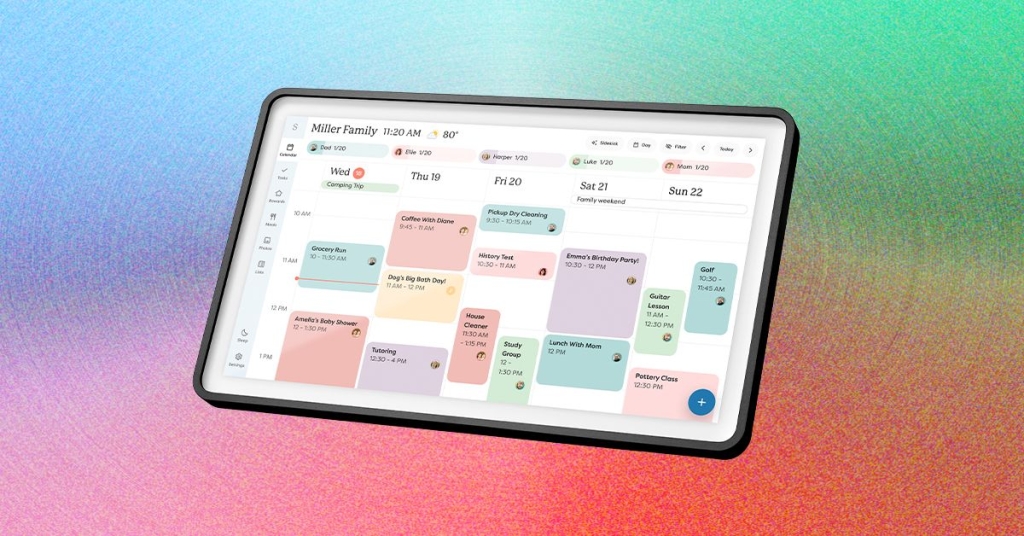
At first glance, the Skylight Calendar 2 appears to be a simple digital calendar. However, this device is far more versatile than it seems. While the calendar is the default view, a quick swipe or click reveals a host of additional features, including Lists, Tasks, Rewards, Meals, Recipes, Photos, Sleep, and Settings. Each tab is designed to streamline different aspects of your life, making it a true all-in-one solution for busy households.
Meals: Plan Your Week with Ease
One of the standout features of the Skylight Calendar 2 is its Meals tab. This feature allows you to plan your weekly meals visually, making it easy to see what’s on the menu at a glance. You can manually add recipes to the Recipes tab, and when you include a recipe in your meal plan, the device can automatically add the ingredients to your grocery list on the Lists tab. While this feature is incredibly convenient, it does require some manual input to get started. For example, if you’re a fan of homemade recipes, you’ll need to add them to the Recipes tab before they can be integrated into your meal planning.
The visual aspect of the Meals page is particularly appealing. You can quickly jot down meal ideas, assign them to specific days, and even color-code them based on your preferences. For instance, if you’re planning a Costco dinner, you can simply type “Giant Meatball” and assign it to Friday’s dinner slot. The device also syncs seamlessly with the Skylight app, allowing you to manage your meals on the go.
Tasks and Rewards: Gamify Your Productivity
The Tasks tab is another useful feature, allowing you to create to-do lists for each family member. While it’s a great way to keep track of chores and responsibilities, it’s worth noting that the device doesn’t send alerts for tasks, even if they’re time-sensitive. This means you’ll need to build a habit of checking the Tasks page regularly to stay on top of your to-dos.
The Rewards tab takes productivity to the next level by gamifying task completion. You can set up a system where family members earn stars for completing tasks, which can then be redeemed for rewards. This feature is especially useful for parents looking to motivate their kids to stay on track with chores and homework.
Photos and Sleep: A Multi-Use Device
One of the most exciting features of the Skylight Calendar 2 is its ability to double as a digital photo frame. When not in use, the device can display a slideshow of your favorite photos, turning it into a beautiful piece of home decor. However, this feature is locked behind a paywall, requiring a Plus Plan subscription ($79 a year or $8 a month).
The Sleep tab is another unique addition, allowing you to track your sleep patterns and set bedtime reminders. While this feature is less central to the device’s core functionality, it’s a nice touch for those looking to improve their sleep hygiene.
The Paywall Problem
While the Skylight Calendar 2 offers a wealth of features, its paywall is a significant drawback. Many of the device’s most appealing features, including the photo screen saver, Rewards, and the AI-powered Sidekick tool, are only accessible with a Plus Plan subscription. This can be frustrating for users who feel they’re already paying a premium for the device itself.
That said, the paywall does come with some benefits. For example, the Plus Plan includes access to the Sidekick AI tool, which can help you manage your schedule, suggest meal ideas, and even provide personalized recommendations. If you’re willing to invest in the subscription, the additional features can significantly enhance your experience with the device.
Final Thoughts
The Skylight Calendar 2 is a powerful tool for families looking to streamline their daily lives. Its intuitive design, versatile features, and seamless integration with the Skylight app make it a standout choice for digital organization. However, the paywall is a significant downside, and it’s worth considering whether the additional features are worth the ongoing cost.
If you’re willing to invest in the Plus Plan, the Skylight Calendar 2 can become a central hub for your family’s schedule, meal planning, and productivity. But if you’re looking for a more straightforward calendar solution, you may find the paywall to be a dealbreaker.
Tags and Viral Phrases:
-
SkylightCalendar2
-
DigitalOrganization
-
FamilyProductivity
-
MealPlanningMadeEasy
-
SmartHomeTech
-
TechForFamilies
-
DigitalPhotoFrame
-
AIProductivityTools
-
PaywallProblems
-
TechReview
-
HomeTechInnovation
-
StayOrganized
-
ViralTechNews
-
GadgetGoals
-
TechTrends2023
This review captures the essence of the Skylight Calendar 2, highlighting its strengths and weaknesses while providing a detailed analysis of its features. Whether you’re a tech enthusiast or a busy parent, this device offers something for everyone—just be prepared to navigate its paywall.
,

Leave a Reply
Want to join the discussion?Feel free to contribute!