
Tested! The best USB-C cables for charging and data transfers
The Ultimate Guide to USB-C Cables: Don’t Get Ripped Off!
USB-C cables seem simple, right? Just a cable to charge your phone or transfer data. But the reality is far more complex—and confusing. Walk into any electronics store or browse online, and you’ll be bombarded with options ranging from $5 budget cables to $130 premium ones. What’s the difference? Are expensive cables worth it?
We’ve tested dozens of USB-C cables to separate the winners from the losers, and we’ve got some shocking revelations that might save you money—or prevent you from wasting it on overpriced cables that don’t deliver.
The USB-C Cable Conspiracy: Why All Cables Aren’t Created Equal
Let me tell you something that manufacturers don’t want you to know: Not all USB-C cables are created equal. In fact, some of the cheapest cables outperform expensive “premium” brands in specific areas.
When we cracked open and tested cables from major brands like Apple, Belkin, and Anker alongside no-name Amazon specials, we discovered massive differences in:
- Charging speeds (some cables limit you to 60W while others handle 240W)
- Data transfer rates (480Mbps vs 40Gbps—that’s a 100x difference!)
- Video output capabilities
- Build quality and durability
- Actual wire gauge and resistance
The worst part? Many cables are deliberately mislabeled. We found cables claiming to support 10Gbps speeds that literally had no wires for those speeds inside. It’s like buying a sports car that can’t go above 25mph!
Our Testing Methodology: No BS, Just Science
Unlike many “reviewers” who just read Amazon reviews and regurgitate marketing copy, we bought every cable retail and put them through rigorous testing:
- Physical inspection – We examined connector quality, wire gauge, and construction
- Electrical testing – Measured resistance, voltage drop, and charging capabilities
- Data transfer tests – Benchmarked speeds using Crystal Disk Mark 8
- Video output testing – Connected to monitors to verify 4K/8K support
- Real-world charging – Tested with actual laptops under load
- eMarker verification – Checked if the cable’s claims matched reality
Best USB-C Cables for Charging (2024)
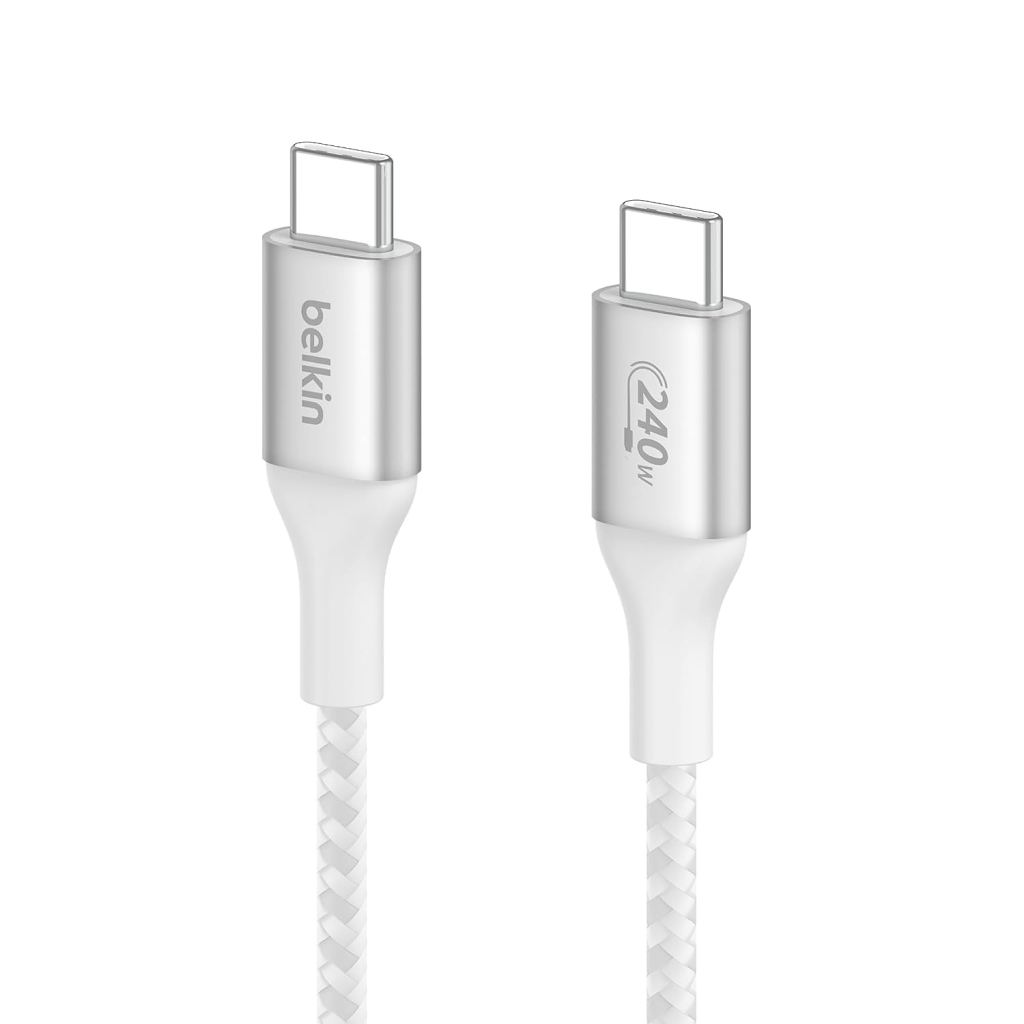
🏆 Belkin BoostCharge 240-watt Charging Cable – The New King
Price: $19.99 | Rating: 9.5/10
After Apple discontinued its excellent 100W cable (and jacked the price to $29.99 for the new 240W version), we found the perfect replacement.
Why it’s amazing:
- Supports the full 240W USB Power Delivery spec
- Dual eMarker chips with over-temperature protection
- Braided exterior that’s survived 30,000+ bend cycles
- Same price as Apple’s old 100W cable
The catch: No high-speed data transfer support—it’s a pure charging cable. But honestly? Most people just need to charge their devices, not transfer terabytes of data daily.
🥈 Anker New Nylon Series 3 USB-C to USB-C 2-pack – Best Value
Price: $13.99 for 2 cables | Rating: 9/10
This is the #1 best-selling USB-C cable on Amazon for good reason. At roughly $7 per cable, you’re getting tremendous value.
What you get:
- 60W charging (perfect for phones, tablets, and small laptops)
- 480Mbps data transfer (slow, but adequate for basic use)
- 12,000 bend cycle rating
- Trusted Anker brand backing
The truth: Most people will never notice the difference between this and a $30 cable for daily charging. Save your money.
🥉 SOOPII 100W 6.6ft USB-C Cable with Display – The Coolest Gimmick
Price: $13.99 | Rating: 8/10
This cable has a built-in display showing real-time charging power. It’s the ultimate nerd gadget!
Features:
- Shows exact wattage being delivered
- 100W charging capability
- Accurate readings verified with professional equipment
The problems: The eMarker chip has incorrect specs (claims 1m length when it’s 2m, falsely claims high-speed data support). But the charging display works perfectly, and it’s been reliable for months of testing.
Best USB-C Cables for Charging AND Data Transfer
If you need cables that can do everything—charge fast, transfer data quickly, and run monitors—these are your best bets.
🏆 Cable Matters 6-foot USB-C Cable – The Do-Everything Champion
Price: $18.99 | Rating: 9.8/10
This cable does it all and does it well. It’s not cheap, but you’re paying for genuine capability.
Capabilities:
- 100W charging
- 20Gbps data transfer
- 4K/8K video output
- USB4 and Thunderbolt 3 compatibility
The trade-off: At 6 feet, it’s limited to 20Gbps (you’d need a shorter cable for 40Gbps). It’s also heavier and less flexible than basic charging cables.
🥈 Cable Matters 0.8m USB4 Cable – For Speed Demons
Price: $14.99 | Rating: 9.5/10
If you need absolute maximum performance and don’t mind the short length, this is your cable.
Why it’s special:
- Full 40Gbps Thunderbolt 3/4 support
- 100W charging
- USB4 certified
- Lowest resistance we measured
The downside: At only 2.6 feet, it’s very short. The thick wires also make it stiff and harder to pack.
Cables to Avoid (Don’t Waste Your Money)
Amazon Basics 6-foot USB-C USB 2.0 Cable
Price: $8.99 | Rating: 4/10
This cable epitomizes “you get what you pay for.” It’s extremely light (which means thin wires) and has some of the highest resistance we measured.
The reality: It charges fine at 60W, but data transfers are painfully slow at 480Mbps. Moving a 1GB file takes nearly a minute versus seconds with a proper USB 3.1 cable.
Anker 6-foot Powerline USB-C (Original)
Price: $12.99 | Rating: 5/10
This is Anker’s oldest USB-C cable, and it shows. It’s limited to 60W charging and USB 2.0 speeds.
The problem: At its price point, you can get much better cables. Even Anker’s newer models offer significantly better performance.
JSAUX USB C to USB C Cable 60W 2-pack
Price: $11.99 for 2 | Rating: 6/10
This top-selling cable proves that popularity doesn’t equal quality. It has the worst resistance measurements we found.
The truth: With over 31,000 positive reviews, it clearly works for basic charging. But the internal construction is subpar, and we question its long-term durability.
How to Read USB-C Cable Marketing BS
Manufacturers use confusing terminology to make cables seem more capable than they are. Here’s what the jargon actually means:
USB 2.0 vs USB 3.1 vs USB4
- USB 2.0: 480Mbps data transfer (very slow)
- USB 3.1 Gen 1: 5Gbps (good for most uses)
- USB 3.1 Gen 2: 10Gbps (great for fast transfers)
- USB4/Thunderbolt 4: 40Gbps (professional-grade)
Wattage Ratings
- 60W: Good for phones, tablets, small laptops
- 100W: Handles larger laptops like MacBook Pro 16″
- 240W: Future-proof for high-performance laptops
The eMarker Scam
Many cheap cables have eMarkers that lie about capabilities. Always verify with actual testing, not marketing claims.
Real-World Recommendations
For iPhone 15 Users
- Charging: Any USB-C to USB-C cable works fine
- Data transfer: Get a 10Gbps cable if you have iPhone 15 Pro
- Don’t buy Apple’s $130 Thunderbolt cable – it’s complete overkill for a phone
For Android Users
- Budget option: Anker 2-pack for basic charging
- Performance option: Cable Matters 6-foot for everything
- Speed demons: Cable Matters USB4 cable for maximum performance
For Laptop Users
- Small laptops (XPS 13, MacBook Air): 60W cable is fine
- Large laptops (XPS 15, MacBook Pro 16″): Need 100W cable
- Gaming/workstation laptops: Wait for 240W cables to become common
The Future of USB-C
USB-C is rapidly becoming the universal standard, replacing everything from Lightning to proprietary laptop chargers. The new 240W spec will eventually power even high-end gaming laptops, and USB4 will continue pushing speeds higher.
But here’s the thing: most people don’t need premium cables. A good $15 cable will handle 95% of use cases perfectly. Only professionals moving massive files or running multiple 8K displays need to spend more.
Tags & Viral Phrases
- USB-C cable testing
- Best USB-C cables 2024
- USB-C charging speeds explained
- Don’t get ripped off by expensive cables
- USB-C vs Thunderbolt differences
- Why your cheap cable is actually better
- The truth about eMarker chips
- USB-C cable resistance testing
- How to spot fake USB-C cables
- USB-C charging standards explained
- The $130 Apple cable controversy
- USB-C cable durability testing
- Real-world USB-C performance
- USB-C cable myths debunked
- Best value USB-C cables
- USB-C cable buying guide
- Why all USB-C cables aren’t equal
- USB-C cable specifications explained
- The future of USB-C charging
- USB-C cable marketing lies revealed
This comprehensive guide reveals everything manufacturers don’t want you to know about USB-C cables. Armed with this information, you’ll never overpay for a cable again—and you might even discover that the cheap cable you already own is perfectly adequate for your needs.
,


Leave a Reply
Want to join the discussion?Feel free to contribute!