
This accessory lets you play Switch 2 games on your iPad or iMac display at 4K resolution
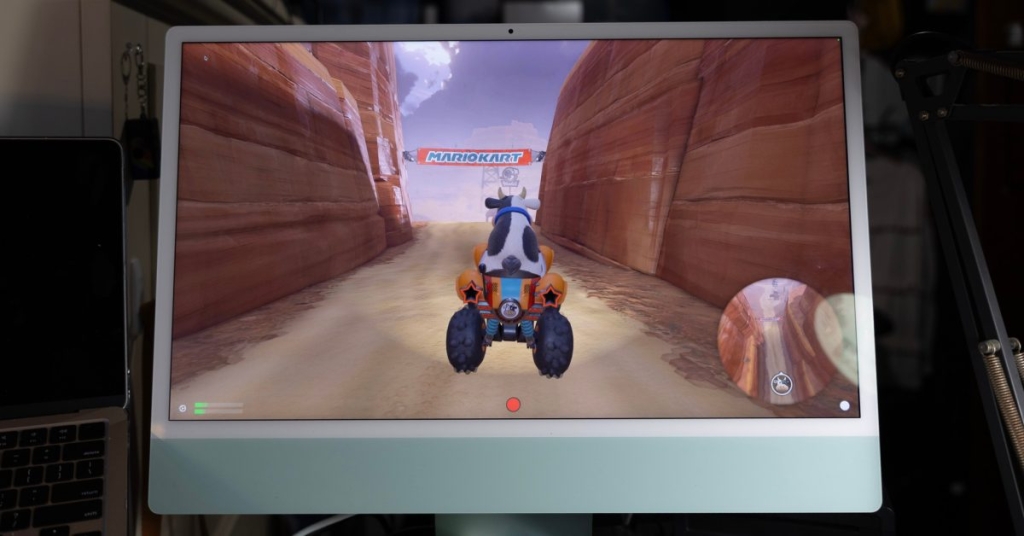
iMacs Get a Second Life: Turn Your Display Into a Gaming Screen with This Clever Hack
Apple’s iMacs have long been celebrated for their stunning Retina displays, but for years, these beautiful panels have been underutilized once the internal hardware becomes outdated. Enter a clever workaround that breathes new life into your iMac—turning it into a gaming display for consoles like the Switch 2, PS5, or Xbox. This viral tech hack is making waves, and here’s everything you need to know.
The Problem: A Display Without Purpose
For years, Apple’s iMacs have featured some of the best displays on the market. However, once the internal hardware becomes obsolete, the display often goes to waste. Apple used to offer a feature called Target Display Mode, which allowed iMacs to function as external monitors. Unfortunately, this feature was discontinued, leaving users with no official way to repurpose their iMac’s display.
The Solution: A Capture Card and an App
The workaround involves two key components: a 4K capture card and a nifty app from the Mac App Store. Here’s how it works:
-
The Hardware: The UGREEN 4K 60Hz Capture Card is the star of the show. Priced at $95, it’s a bit of an investment, but it’s one of the few affordable options that supports 4K at 60Hz. Cheaper alternatives often skimp on quality, offering only 4K at 30Hz. The UGREEN card also supports HDR and up to 240Hz (though not at 4K), making it versatile for various use cases.
-
The Software: For Mac users, the UVC Video Capture app is the go-to solution. It requires a $9.99/year subscription but offers a free trial. For iPad users, Orion from the makers of Halide is a great alternative. It’s free to start and has a one-time $9.99 purchase for additional features like brightness adjustment.
How It Works
Setting up this hack is surprisingly simple:
- Connect your gaming console (e.g., Switch 2, PS5, or Xbox) to the capture card using an HDMI cable.
- Plug the capture card’s USB-C cable into your iMac or iPad.
- Open the UVC Video Capture or Orion app, and voilà—your console’s display should appear on your iMac or iPad screen.
The latency is impressively low, making it nearly indistinguishable from a native output. Users have reported seamless gameplay with titles like Mario Kart World and Fortnite.
Why This Hack is Going Viral
This hack is gaining traction for several reasons:
- Cost-Effective: Instead of buying a separate gaming monitor, you can repurpose your existing iMac or iPad.
- Convenience: It’s a sleek, space-saving solution for gamers who want to use their iMac as a secondary display.
- Versatility: The setup works with a variety of devices, including consoles, PCs, and even streaming devices.
The Future: Will Apple Bring Back Target Display Mode?
While this hack is a fantastic workaround, many are hoping Apple will bring back Target Display Mode with expanded functionality. The original feature was discontinued due to technical limitations with Intel chips, but with Apple Silicon, there’s hope for a revival. Until then, this capture card and app solution is the best way to make the most of your iMac’s display.
Final Thoughts
This viral tech hack is a game-changer for iMac owners looking to extend the life of their devices. Whether you’re a gamer, a streamer, or just someone who loves tinkering with tech, this solution offers a creative way to repurpose your iMac’s display. So, are you ready to give your iMac a second life? Let us know in the comments!
Tags & Viral Phrases:
- iMac gaming display hack
- Turn your iMac into a gaming monitor
- UGREEN 4K capture card
- Target Display Mode revival
- Switch 2 on iMac
- PS5 on iMac display
- Xbox on iMac screen
- 4K 60Hz capture card
- UVC Video Capture app
- Orion app for iPad
- Low latency gaming setup
- Repurpose your iMac display
- Apple Silicon and gaming
- Gaming on iMac Reddit
- DIY iMac monitor hack
- Best capture card for gaming
- iMac display mode hack
- Gaming on iPad Pro
- Switch 2 HDMI capture
- iMac second life tech hack
,


Leave a Reply
Want to join the discussion?Feel free to contribute!