
This feature on the Xiaomi 17 Ultra convinced me to use the phone as my daily driver
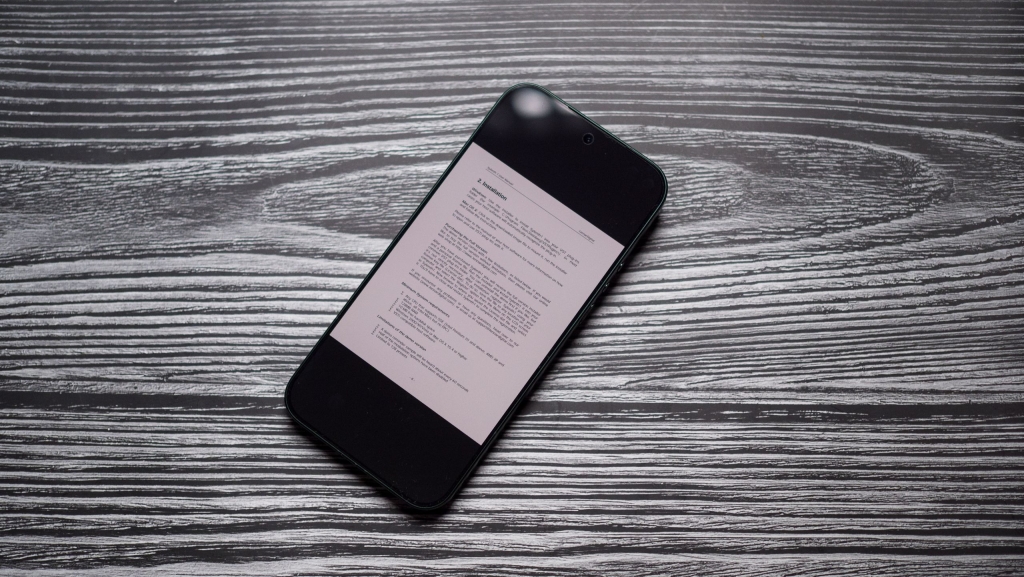
Xiaomi 17 Ultra’s Reading Mode: A Game-Changer for Book Lovers
In the ever-evolving world of smartphones, Xiaomi has once again proven its innovation with the Xiaomi 17 Ultra, a device that’s not just a powerhouse in performance but also a dream come true for avid readers. While most flagship phones focus on camera capabilities, battery life, or processing speed, Xiaomi has taken a unique approach by integrating a dedicated Reading Mode that transforms the 17 Ultra into a portable e-reader. This feature is so impressive that it might just make you forget your Kindle at home.
The Accidental Discovery
It all started on a recent trip when I realized, just as I was about to board my flight, that I had forgotten to pack my trusty Kobo e-reader. Panic set in—how would I survive a long-haul flight without my books? But then I remembered I was using the Xiaomi 17 Ultra, and a wave of relief washed over me. Why? Because Xiaomi’s Reading Mode is nothing short of revolutionary.
What Makes Xiaomi’s Reading Mode Stand Out?
While many smartphone brands have introduced similar features, Xiaomi’s implementation is leagues ahead. The Reading Mode on the 17 Ultra allows you to switch the entire screen to monochrome, creating an experience that’s remarkably similar to reading on an E Ink device. When you combine this with the ability to dim the screen’s brightness, the result is a display that’s incredibly easy on the eyes, even during extended reading sessions.
But Xiaomi didn’t stop there. The feature offers three distinct modes: Classic, Cycle, and Full Color. The Classic mode is particularly noteworthy, as it allows you to choose between monochrome, toned-down colors, or full-color display. Additionally, you can manually adjust the color balance to suit your preferences, making the experience even more personalized.
A Texture That Feels Like Paper
One of the standout features of Xiaomi’s Reading Mode is the Texture slider, which adds a grainy effect to the screen. This subtle addition mimics the feel of reading on actual paper, enhancing the overall experience. Whether you’re diving into a gripping novel or catching up on the latest news, this feature makes reading on the 17 Ultra a joy.
How to Enable Reading Mode
Activating Reading Mode on the Xiaomi 17 Ultra is a breeze. Here’s how you can do it:
- Navigate to Settings on your device.
- Go to Display & Brightness.
- Select Reading Mode.
- Toggle it to On.
- Choose your preferred option. For a true e-reader experience, select Classic and then Black and White.
Why It’s a Game-Changer
Before trying the Xiaomi 17 Ultra, I hadn’t used my phone for reading in years. But this device has completely changed my perspective. The convenience of having a high-quality reading experience in my pocket is unmatched. Whether I’m commuting, traveling, or simply relaxing at home, the 17 Ultra has become my go-to device for reading.
More Than Just a Reading Device
While the Reading Mode is a standout feature, the Xiaomi 17 Ultra excels in other areas as well. It boasts a massive battery, a stunning design, and cameras that rival even the best in the market. In fact, it’s safe to say that the 17 Ultra is a better choice than the Galaxy S26 Ultra in many ways.
Final Thoughts
Xiaomi’s Reading Mode is a testament to the brand’s commitment to innovation and user experience. It’s a feature that sets the 17 Ultra apart from its competitors and makes it a must-have for book lovers. So, the next time you’re packing for a trip, you might just find yourself leaving your e-reader behind—because the Xiaomi 17 Ultra has got you covered.
Tags & Viral Phrases:
Xiaomi 17 Ultra, Reading Mode, E Ink, monochrome display, book lovers, portable e-reader, smartphone innovation, best phones of 2026, Galaxy S26 Ultra, massive battery, stunning design, camera powerhouse, user experience, tech game-changer, must-have device, convenience, reading on the go, personalized display, grainy texture, paper-like feel, long-haul flights, commuting, relaxing at home, flagship phones, Android Central, trusted companion, Android world.
,

Leave a Reply
Want to join the discussion?Feel free to contribute!