
This free tool checks if a link is safe in seconds
Headline:
“Before You Click: How to Instantly Verify if a Website is Safe Using URL Void”
Subheadline:
“In an era of rampant phishing scams and malware attacks, a free tool from NoVirusThanks offers peace of mind with just one click.”
By Tech Insight Daily | April 2025
The digital world is full of hidden dangers. One wrong click on a malicious link can expose your device to malware, compromise sensitive data, or even drain your bank account. With phishing schemes becoming more sophisticated and malicious websites popping up every day, how can you protect yourself before you even land on a suspicious page?
Enter URL Void, a powerful and free online tool developed by NoVirusThanks, a reputable cybersecurity provider. This service allows you to scan any URL and check whether it’s flagged by multiple security databases before you take the risk of visiting it.
How URL Void Works
The process is straightforward and takes just seconds. Here’s how to use it:
- Navigate to www.urlvoid.com.
- Enter the URL you want to check into the search bar.
- Click on the “Scan Website” button.
Once you initiate the scan, URL Void begins querying a vast network of security databases and reputation services. It doesn’t just check one or two sources—it aggregates data from over 40 different blacklist providers, phishing databases, and online reputation systems.
What URL Void Checks
URL Void casts a wide net to give you the most comprehensive security assessment possible:
- Blacklist Providers: It checks if the URL appears on any of the major blocklists maintained by cybersecurity organizations worldwide.
- Phishing Databases: It queries databases specifically designed to track and flag phishing attempts, such as PhishTank and Google Safe Browsing.
- Reputation Services: It consults platforms like Web of Trust (WOT), which crowdsources website safety ratings based on user experiences.
- Antivirus Engines: It runs the URL through multiple antivirus engines, including Avast, Bitdefender, and Kaspersky, to see if any flag it as malicious.
Understanding the Results
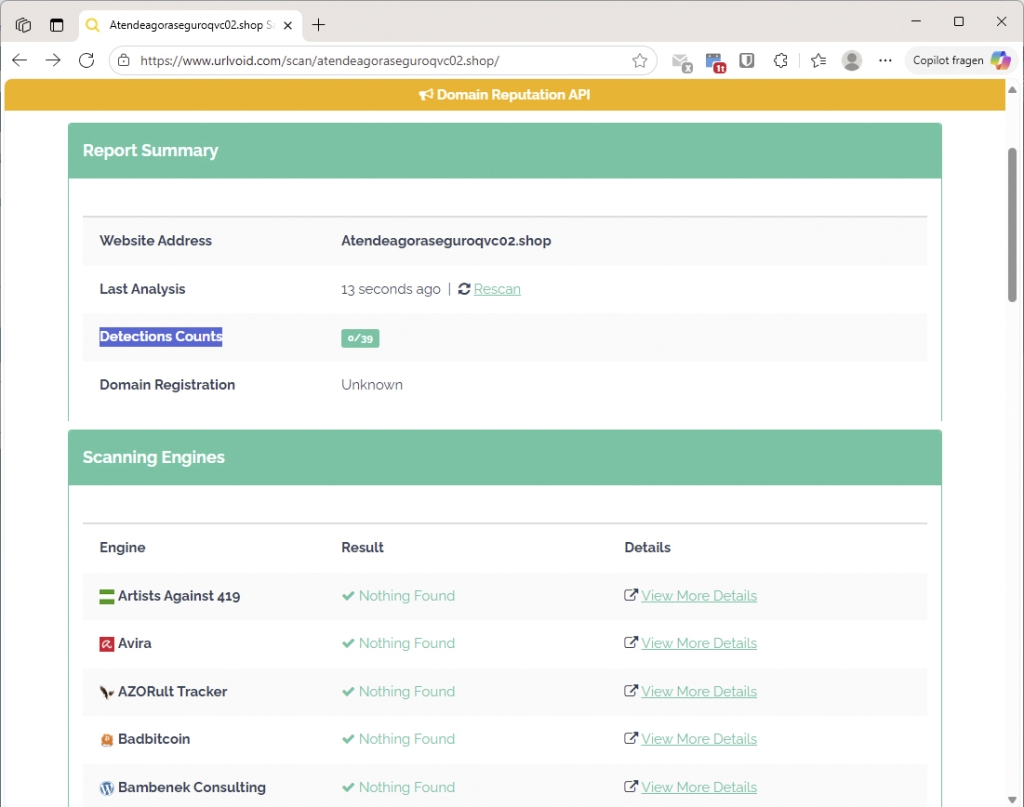
After the scan completes, URL Void presents you with a summary report. The most prominent figure is the “Detection Count”, which shows how many of the 39+ services flagged the URL as suspicious.
- 0/39 means no services reported any issues—this is a good sign, but not a guarantee of safety.
- 2/39 means two services detected something potentially harmful.
- Higher numbers indicate a greater likelihood that the site is dangerous.
The tool also provides a breakdown of which specific services flagged the URL and what kind of threat they identified (e.g., malware, phishing, spam, or suspicious activity).
The Limitations You Should Know
While URL Void is an excellent first line of defense, it’s important to understand its limitations:
- New Threats May Go Undetected: Malicious websites can be created and taken down within hours. If a site is brand new, it might not yet be listed on any blacklist.
- False Positives Are Possible: Sometimes, legitimate websites get flagged due to outdated information, misconfiguration, or shared hosting with a compromised site.
- No Tool is 100% Foolproof: URL Void should be used as part of a broader security strategy, not as your only line of defense.
For example, if only two out of 39 services flag a site, it could be a false alarm—or it could be a brand-new phishing page that hasn’t yet been widely reported. Use your judgment and consider the context.
Why This Matters More Than Ever
Cybercrime is on the rise. According to recent reports, phishing attacks increased by over 60% in 2024, with attackers using increasingly convincing tactics, including fake login pages that mimic real services like Google, Microsoft, and your bank.
By using tools like URL Void, you add an extra layer of protection. It’s a small step that can save you from major headaches—or even financial loss.
Final Thoughts
In a world where a single click can compromise your digital life, proactive safety checks are essential. URL Void offers a fast, free, and reliable way to assess the safety of any website before you visit it. While it’s not perfect, it’s a valuable tool in your cybersecurity toolkit.
So next time you receive a suspicious link—whether in an email, a text message, or a social media post—don’t take the risk. Scan it first with URL Void. It only takes a few seconds, but it could save you hours of trouble.
Tags & Viral Phrases:
url void, website safety check, phishing protection, cybersecurity tool, scan suspicious links, avoid malware, online security, no virus thanks, blacklist check, web of trust, safe browsing, phishing database, antivirus scan, cyber threat detection, internet safety, malicious website, free security tool, digital protection, online scam prevention, URL scanner, threat intelligence, security awareness, avoid phishing, malware detection, website reputation, cyber hygiene, online privacy, safe internet use, phishing alert, cyber defense, security checklist, URL analysis, threat prevention, online trust, web safety, cyber scam, digital safety, URL blacklist, phishing site, security scan, online threat, malware check, internet threat, URL reputation, cybersecurity awareness, safe browsing tool, threat scanner, online protection, cyber security, phishing defense, malware protection, URL safety, internet security, cyber safety, online scanning, security verification, URL analysis tool, threat check, phishing prevention, safe URL, cyber threat, online scam, malware scanner, URL checker, security tool, phishing test, website scan, threat assessment, online security tool, URL reputation check, cyber protection, phishing scan, malware alert, website blacklist, online threat check, URL threat, cyber scam alert, security scan online, phishing website, malware site, URL threat check, online safety, cyber threat scan, phishing detection, malware warning, URL security, website threat, online phishing, cyber security tool, URL malware, phishing alert tool, website security check, URL phishing, cyber threat tool, online threat scanner, URL threat scanner, phishing security, malware threat, website phishing, URL security check, online phishing test, cyber security scan, URL threat assessment, phishing protection tool, malware scanner online, URL security tool, website threat check, online phishing scanner, cyber security check, URL threat analysis, phishing threat, malware checker, website security tool, URL phishing check, cyber threat scanner, online threat analysis, URL threat detection, phishing scanner, malware check online, website threat scanner, URL security analysis, cyber threat assessment, online phishing check, phishing threat scanner, malware threat check, URL threat tool, website threat analysis, online threat scanner tool, URL threat check tool, phishing threat check, malware threat scanner, website threat tool, URL threat analysis tool, online threat check tool, URL threat scanner tool, phishing threat tool, malware threat tool, website threat check tool, URL threat check analysis, online threat check analysis, URL threat scanner analysis, phishing threat analysis, malware threat analysis, website threat analysis tool, URL threat check tool online, online threat check tool online, URL threat scanner tool online, phishing threat tool online, malware threat tool online, website threat tool online, URL threat check analysis online, online threat check analysis online, URL threat scanner analysis online, phishing threat analysis online, malware threat analysis online, website threat analysis tool online.
,


Leave a Reply
Want to join the discussion?Feel free to contribute!