
This Galaxy S26 feature is so powerful I might skip carrying a laptop
Samsung DeX on Galaxy S26 Ultra: A Laptop Replacement in Your Pocket
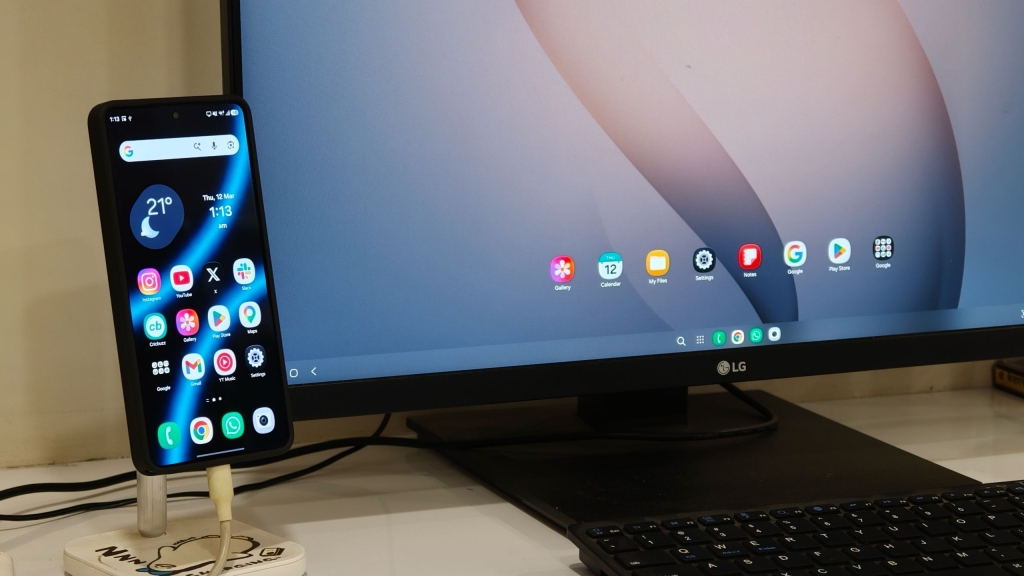
Samsung’s DeX desktop mode has been a staple feature on Galaxy devices for years, offering users a desktop-like experience when connected to an external monitor. With the launch of the Galaxy S26 Ultra, Samsung has quietly supercharged DeX, making it powerful enough to potentially replace your laptop in certain scenarios.
The Evolution of DeX
DeX has always been one of Samsung’s standout features, allowing users to connect their Galaxy devices to external displays via USB-C and transform their phone into a desktop workstation. While Google has made strides with Android’s desktop mode in recent updates, Samsung DeX continues to lead in terms of functionality and polish.
The Galaxy S26 Ultra doesn’t have the luxury of a foldable screen like the Galaxy Z Trifold, which can switch between One UI and DeX mode directly on the device. However, what Samsung has achieved with the S26 Ultra is nothing short of remarkable.
Powerhouse Performance
The Snapdragon 8 Elite Gen 5 processor powering the Galaxy S26 Ultra provides the horsepower needed for a truly desktop-like experience. This new processor allows DeX to run multiple applications simultaneously without the performance degradation we’ve seen in previous generations.
What truly sets the S26 Ultra’s DeX apart is the introduction of multiple desktop support. Users can now open up to four virtual desktops, each capable of running up to five applications side by side. This means you can have up to 20 apps running concurrently across different workspaces – a level of multitasking that rivals traditional desktop operating systems.
Real-World Performance
During testing with a 27-inch 4K LG monitor, the Galaxy S26 Ultra delivered a surprisingly smooth experience. Applications opened quickly, animations remained fluid, and supported software like Chrome and Google apps felt right at home in the larger workspace.
The system handles demanding tasks like photo and video editing with ease, while still maintaining responsiveness for everyday productivity work like document creation, email management, and web browsing.
Enhanced Productivity Features
Samsung has added several thoughtful touches to make the DeX experience even more productive:
- Navigation shortcuts: Users can enable Command + Arrow key functionality to quickly switch between virtual desktops, similar to macOS Spaces
- Phone functionality: Unlike some desktop modes that lock your phone, DeX on the S26 Ultra allows you to continue using your phone normally while the desktop interface runs on the external display
- Customization options: Through the Settings app, users can adjust monitor resolution, mouse tracking speed, and even use the phone as a touchpad for the external display
Practical Applications
The implications of this enhanced DeX experience are significant. Imagine attending a trade show or business meeting with just your phone and a portable monitor. With a simple USB-C connection, you have access to a full desktop workspace capable of handling most productivity tasks.
This setup is particularly valuable for professionals who frequently travel or work in multiple locations. Instead of carrying a laptop, you could potentially rely on your Galaxy S26 Ultra paired with a portable monitor and keyboard.
Room for Improvement
While the current DeX implementation is impressive, there’s still room for enhancement. The ability to run more than two apps in split-screen mode simultaneously would further improve productivity. Additionally, better integration with desktop-class software and expanded file system access would make DeX even more compelling as a laptop replacement.
The Future of Mobile Computing
Samsung’s continued investment in DeX suggests a future where our primary computing device could be the smartphone in our pocket. As mobile processors continue to advance and software optimization improves, the line between mobile and desktop computing will likely blur even further.
For now, the Galaxy S26 Ultra’s DeX mode represents the most capable smartphone-to-desktop experience available, offering a glimpse into a future where laptops might become optional for many users.
Tags: Samsung DeX, Galaxy S26 Ultra, Snapdragon 8 Elite Gen 5, desktop mode, mobile productivity, smartphone computing, USB-C display, multitasking, virtual desktops, laptop replacement
Viral phrases: “laptop killer,” “desktop in your pocket,” “mobile workstation,” “productivity powerhouse,” “game-changing feature,” “future of computing,” “desktop experience,” “mobile-first workflow,” “productivity revolution,” “transform your phone”
,

Leave a Reply
Want to join the discussion?Feel free to contribute!