
This small change makes transferring data to your new Android phone a lot easier
Google’s Data Transfer Feature Just Got a Major Upgrade—Here’s Why It Matters
If you’re anything like me, switching to a new phone is both exciting and nerve-wracking. The thrill of unboxing the latest device is quickly followed by the dread of transferring all your data—apps, photos, contacts, messages—without losing anything important. As someone who cycles through over 75 phones a year, I’ve become something of a data transfer expert. And let me tell you, Google’s recent tweaks to Android’s data transfer feature have made this process smoother than ever.
The Evolution of Android Data Transfer
For years, Android’s built-in data transfer feature has been reliable, but not exactly groundbreaking. You’d connect your old and new phones, hit transfer, and wait—sometimes for what felt like an eternity—without much visibility into what was actually happening. Last year, Google rolled out some subtle but game-changing improvements that have transformed the experience.
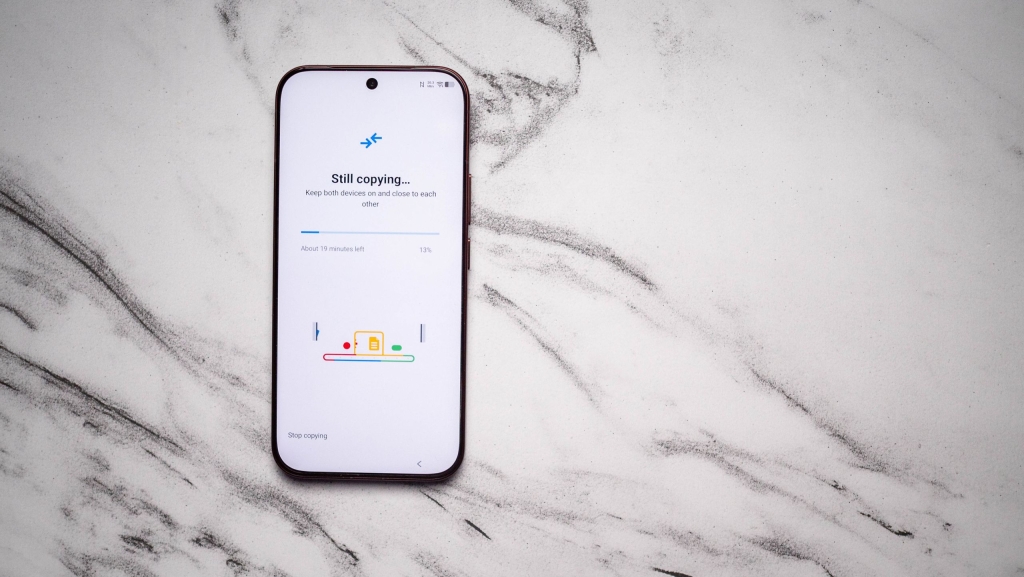
The most obvious change? The addition of a percentage indicator during transfers. This might seem like a small detail, but trust me, it makes a world of difference. No more staring at your screen wondering if the transfer has stalled or how much longer you’ll need to wait. Now you can actually see your progress in real-time.
Why the Percentage Indicator Is a Game-Changer
Let me share a recent experience that highlights just how valuable this feature has become. When I switched to a new phone launching later this month, the transfer initially estimated 20 minutes. After 30 minutes, it still showed 16 minutes remaining—not exactly confidence-inspiring. But here’s where the percentage indicator saved the day: it showed I was at 54% completion. That meant the transfer was still actively working, just taking longer than initially estimated.
This transparency eliminates so much anxiety during the transfer process. You can actually plan your time better, knowing whether you should wait it out or step away for a bit. It’s one of those features that seems obvious in hindsight but makes you wonder how we ever lived without it.
Wireless Transfers: No Longer the Compromise They Once Were
Another significant improvement is the reliability of wireless transfers. Historically, I’ve recommended using a USB-C to USB-C cable for the most dependable connection—it’s the gold standard for ensuring nothing goes wrong during the transfer. But Google has clearly been working on the wireless side of things.
In recent months, I’ve successfully completed multiple wireless transfers without a single hiccup. The process takes a bit longer than wired transfers, but the convenience factor is undeniable. No more hunting for the right cable or dealing with connection issues. Just place both phones near each other, follow the prompts, and let the magic happen.
The Stalling Problem: Solved
Anyone who’s done multiple phone transfers knows the frustration of mid-transfer stalls. Your devices would lose connection, or worse, the transfer would appear complete but crucial data would be missing. These issues seem to be largely resolved now.
Even when switching between devices running different Android versions, the transfers have been consistently reliable. This cross-compatibility is crucial as Android’s ecosystem includes everything from brand-new flagship devices to older models still in active use.
How Google’s Solution Compares to the Competition
It’s worth noting that while Google’s solution has improved dramatically, it still doesn’t quite match what some Chinese manufacturers offer. Companies like OPPO, Vivo, and Xiaomi have developed their own proprietary transfer utilities that work significantly faster than Android’s built-in option.
However, there’s a catch: these utilities are typically limited to devices sold in China or within specific manufacturer ecosystems. If you’re switching between brands or using a global version of a phone, you’re back to relying on Android’s native solution.
What I appreciate about Google’s approach is the consistency it provides. No matter which Android phone you’re switching to—whether it’s a Pixel, Samsung, Nothing, or any other brand—you get the same reliable transfer experience. This universality is something the proprietary solutions simply can’t match.
The Bigger Picture: Google’s Commitment to Polish
These improvements to data transfer might seem minor in isolation, but they’re part of a broader trend I’ve noticed in Google’s approach to Android. The company is clearly focusing on refining the user experience with thoughtful touches that address real pain points.
From the QR code that makes sharing Wi-Fi credentials easier to the percentage indicators that keep you informed, these changes demonstrate attention to detail that elevates the entire Android experience. It’s the kind of polish that makes switching to a new phone less daunting and more enjoyable.
Looking Ahead
As someone who handles dozens of phone transfers annually, I can confidently say that Android’s data transfer feature is in the best shape it’s ever been. The combination of visual progress indicators, improved wireless reliability, and cross-device compatibility makes the process almost painless.
For the average user who might switch phones once every couple of years, these improvements might go unnoticed. But for power users, reviewers, and anyone who frequently changes devices, they represent a significant quality-of-life upgrade.
The next time you’re setting up a new Android phone, take a moment to appreciate how far this feature has come. What was once a source of anxiety is now a streamlined, transparent process that gets you up and running on your new device faster than ever.
Tags: Android data transfer, Google Pixel, phone setup, wireless transfer, USB-C transfer, data migration, Android tips, smartphone setup, tech tutorial, mobile data
Viral Phrases: game-changer, set up in minutes, no more waiting in the dark, wireless wins, percentage progress, transfer transparency, cross-device compatibility, universal solution, polish matters, quality of life upgrade
,

Leave a Reply
Want to join the discussion?Feel free to contribute!