
This Smartphone Lets You Use Windows, But Is Far From A New Windows Phone
NexPhone: The Bold Attempt to Bring Windows 11 to Your Pocket
In a move that has tech enthusiasts buzzing, Nex Computer has unveiled the NexPhone—a device that dares to challenge the boundaries between smartphones and desktop computing. With the ability to run Android, Linux, and Windows 11, this smartphone is not just another gadget; it’s a potential game-changer for those who crave versatility in their pocket. But is it the revolutionary device it claims to be, or is it a niche product with too many compromises? Let’s dive into the details.
The Windows Phone Dream Lives On
For many, the demise of Windows Phone in 2017 was a bittersweet moment. While Microsoft officially pulled the plug on the platform, a dedicated community of enthusiasts has kept the dream alive. Now, Nex Computer is taking a bold step by offering Windows 11 on a smartphone, a feat that has long been the stuff of tech fantasies. The NexPhone is not just a phone; it’s a mini-desktop that fits in your pocket, promising to deliver a full-fledged Windows experience on the go.
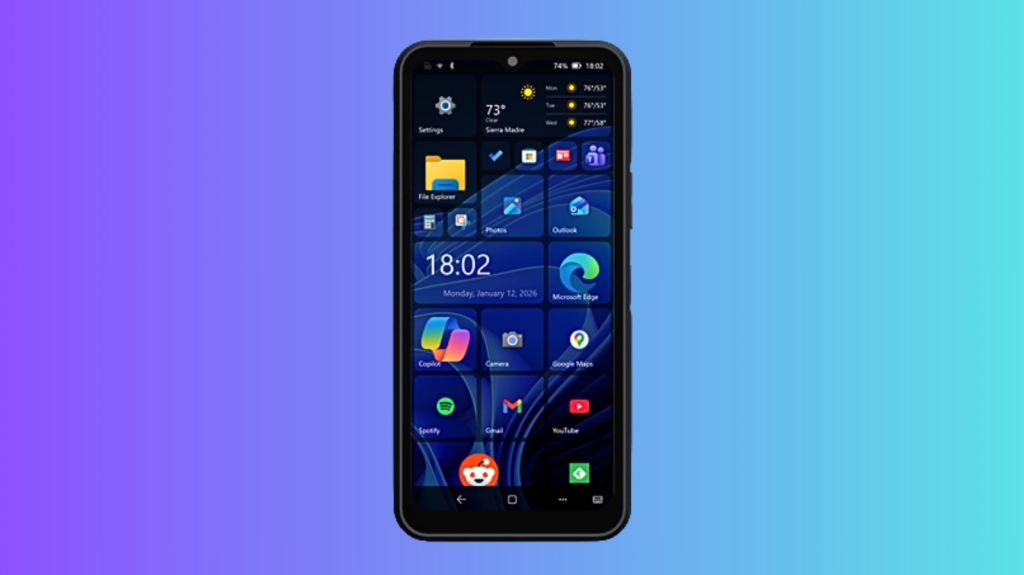
But here’s the catch: running desktop-class Windows on a smartphone has always been a challenge. Traditional approaches often result in a clunky, unoptimized experience with tiny icons, awkward orientations, and sluggish performance. Nex Computer, however, has taken a different route. Instead of forcing the desktop interface onto a small screen, they’ve built a custom mobile UI from the ground up, inspired by the sleek and intuitive design of Windows Phone. This approach ensures that the Windows 11 experience on the NexPhone is not only functional but also user-friendly for touch-based interactions.
A Seamless Transition Between Mobile and Desktop
One of the standout features of the NexPhone is its ability to seamlessly transition between mobile and desktop modes. When you’re using the phone in its default state, the custom UI provides a smooth and intuitive experience. But when you connect the NexPhone to an external display, the full-fledged Windows 11 interface takes over, offering a proper desktop computing experience. This dual-mode functionality is a game-changer for professionals who need the flexibility to switch between mobile and desktop environments without carrying multiple devices.
The NexPhone also supports Linux, specifically Debian, and offers a desktop mode for both Linux and Windows 11. This means that users can choose the operating system that best suits their needs, whether it’s the familiarity of Windows, the versatility of Linux, or the convenience of Android. The ability to run three different operating systems on a single device is a testament to Nex Computer’s ambition and technical prowess.
Hardware: A Mid-Range Powerhouse
Under the hood, the NexPhone is powered by Qualcomm’s DragonWing QCM6490 chip, a mid-range processor that offers a balance between performance and efficiency. While it may not rival the raw power of flagship processors, it’s more than capable of handling everyday tasks and light productivity work. The phone is equipped with 12GB of RAM and 512GB of onboard storage, ensuring that users have plenty of memory and space for their apps, files, and media.
The NexPhone’s hardware is complemented by a 6.58-inch 120Hz display, a 64MP main camera, and a 5,000mAh battery. These specifications make it a capable smartphone in its own right, even before you consider its unique ability to run Windows 11. The device also boasts a rugged MIL-STD-810H military-grade build with IP68 and IP69K ratings for dust and water resistance, making it a durable companion for both work and play.
The Catch: Connectivity and Compatibility
While the NexPhone offers an impressive array of features, it’s not without its limitations. One of the most significant drawbacks is the lack of cellular connectivity when running Windows 11. This means that if you’re using the phone in Windows mode, you won’t be able to make calls, send texts, or use mobile data. To access these features, you’ll need to switch back to Android mode, which could be inconvenient for some users.
Additionally, the NexPhone runs Windows on Arm, not the x86 version of Windows that most users are familiar with. While Microsoft has made significant strides in improving compatibility for x86 apps on Arm devices, there may still be some apps that don’t work as expected. This could be a dealbreaker for users who rely on specific software for their work or personal use.
Linux users may also encounter some issues, as the NexPhone’s Linux app has been reported to have stability problems. In a demo video, the lightweight fastfetch utility crashed while trying to display system information, raising concerns about the overall reliability of the Linux experience on the device.
Pricing and Availability
The NexPhone is priced at $549 and is now available for pre-orders. While this may seem like a steep price for a mid-range smartphone, it’s important to consider the unique value proposition that the NexPhone offers. For users who need a portable Windows machine or who want the flexibility to run multiple operating systems on a single device, the NexPhone could be a worthwhile investment.
However, it’s worth noting that Nex Computer is not positioning the NexPhone as a replacement for your primary smartphone. Instead, it’s being marketed as a secondary device or a backup phone. This approach makes sense, given the device’s limitations and the fact that it’s not designed to be a do-it-all solution for everyone.
The Future of Mobile Computing?
The NexPhone represents a bold attempt to bridge the gap between smartphones and desktop computing. By offering Windows 11, Linux, and Android on a single device, Nex Computer has created a product that appeals to tech enthusiasts, professionals, and anyone who values versatility in their gadgets. However, the device’s limitations—particularly its lack of cellular connectivity in Windows mode and potential compatibility issues—mean that it’s not a perfect solution for everyone.
As the tech world continues to evolve, the NexPhone raises important questions about the future of mobile computing. Will we see more devices that blur the line between smartphones and desktops? Can Windows on Arm become a viable alternative to x86 for everyday users? Only time will tell. For now, the NexPhone stands as a fascinating experiment in pushing the boundaries of what a smartphone can do.
Tags: NexPhone, Windows 11 on smartphone, Linux on smartphone, Android, mobile computing, Nex Computer, Qualcomm DragonWing QCM6490, Windows Phone revival, portable Windows machine, dual-mode smartphone, rugged smartphone, IP68, IP69K, MIL-STD-810H, 120Hz display, 64MP camera, 5,000mAh battery, tech innovation, future of smartphones, mobile desktop, Windows on Arm, x86 compatibility, tech enthusiasts, secondary phone, backup device, pre-orders, $549 smartphone, tech news, viral tech, groundbreaking smartphone.
Viral Sentences:
- “NexPhone: The smartphone that dares to run Windows 11 in your pocket!”
- “Say goodbye to carrying a laptop—NexPhone brings desktop computing to your palm!”
- “Is this the future of mobile computing? NexPhone challenges the status quo!”
- “Windows 11 on a phone? NexPhone makes it a reality—but is it worth it?”
- “NexPhone: The ultimate gadget for tech enthusiasts and power users!”
- “NexPhone’s custom UI brings back the spirit of Windows Phone—but with a modern twist!”
- “Can NexPhone replace your laptop? Here’s what you need to know!”
- “NexPhone’s lack of cellular connectivity in Windows mode is a dealbreaker—or is it?”
- “NexPhone: A bold experiment in mobile computing that’s too good to ignore!”
- “NexPhone’s rugged design and multi-OS support make it a must-have for adventurers and professionals alike!”
,


Leave a Reply
Want to join the discussion?Feel free to contribute!