
Ubuntu 26.04 LTS adds Snap and web search to the Overview
Ubuntu 26.04 LTS: Two New Search Extensions Make GNOME Shell More Powerful Than Ever
Ubuntu 26.04 LTS is here, and it’s packing some serious search firepower right out of the box. Two brand-new extensions are now enabled by default in the GNOME Shell Overview, transforming how you discover apps and access the web. Whether you’re a power user or just someone who appreciates a smoother workflow, these additions are worth knowing about.
Web Search Provider: One Click to Google
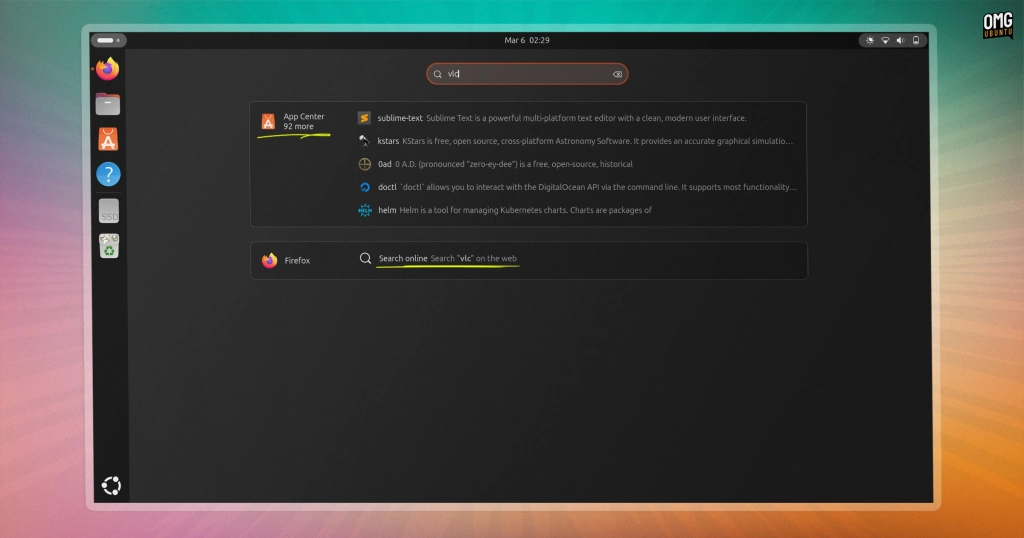
The first extension, Web Search Provider, adds a slick shortcut that lets you jump straight to Google from the GNOME Shell Overview. Here’s how it works: press the Super key, type your query, and instead of launching a local search, you’ll see a prompt to “Search the web.” Click it, and Firefox (or your default browser) opens a new tab with your search already filled in on Google—complete with Ubuntu’s referral parameters.
Before you panic about privacy, this isn’t a return to the controversial “Shopping Lens” days. Back in Ubuntu 12.10, local file and app searches were sent to Canonical’s servers and then to Amazon—a move that earned Canonical a “Big Brother” award from privacy advocates. This new Web Search Provider is different: it only sends your query to the web after you explicitly click the search button. No data is sent until you say so.
This concept isn’t entirely new—GNOME Web (Epiphany) has had its own search provider for years—but now it’s baked into Ubuntu’s default setup. It’s a small convenience that could save you a click or two, though it’s just as easy to ignore if you prefer your current workflow.
Snap Search Provider: Discover Apps Without Leaving the Overview
The second extension, Snap Search Provider, is all about app discovery. It hooks into snapd, the daemon that powers the Snap package format, and matches your search terms against software available in the Canonical Snap Store. Results appear right alongside your installed apps, complete with icons and short descriptions.
For example, press Super, type “VLC,” and you’ll see both your installed apps and relevant Snap Store results. Click one, and the App Center (formerly known as snap-store) opens directly to that listing, ready for you to install.
This is a big step up from older methods. If you’ve used Ubuntu’s GNOME Software or the old Software Center fork, you’ll notice this is more tightly integrated and opens the newer, Flutter-based App Center. It’s also reminiscent of the “Available Apps” suggestions that used to appear in Ubuntu’s Unity-era launcher, but with a more modern twist.
How It Works (and Why It’s Safe)
Both extensions are designed with privacy in mind. The Snap Search Provider doesn’t send your queries to a remote server directly. Instead, it passes your search term to snapd, which handles the lookup locally—just like opening App Center and searching manually, but faster and without the context switch.
The Web Search Provider only queries the web after you click, so there’s no sneaky data collection happening in the background.
A Few Rough Edges
While both extensions are useful, they’re not perfect. The Snap Search Provider’s matching can be a bit loose—searching for “VLC” might bring up plenty of tangential results, but not always the one you’re after. The source code also includes a commented-out web-based fallback that would send queries directly to the Snap Store online, but the developers have opted to keep that disabled for now.
There’s also a thoughtful touch: the extension won’t initiate a search if you’re on a metered connection, saving you from accidental data usage.
Easy to Enable or Disable
If you’re not a fan of these new features, you can disable both extensions with just a couple of clicks. At worst, they’re two more toggles in your extensions list. At best, they could save you a click or two now and then.
Ready to Try?
Both extensions are present and enabled by default in the latest Ubuntu 26.04 LTS daily builds, though they’re not necessarily finished. If you’re feeling adventurous, you can test them out now and see how they fit into your workflow.
Ubuntu 26.04 LTS is shaping up to be a release that balances innovation with user choice—giving you new tools without forcing them on you. Whether you embrace these new search extensions or leave them disabled, it’s clear that Ubuntu is continuing to evolve and refine the desktop experience.
Tags: Ubuntu 26.04 LTS, GNOME Shell, search extensions, Web Search Provider, Snap Search Provider, app discovery, privacy, Snap Store, App Center, daily builds, Linux desktop
Viral Phrases: “Ubuntu 26.04 LTS is here!”, “Two new search extensions by default!”, “Privacy-friendly search”, “App discovery made easy”, “Save a click or two”, “Not your grandma’s Ubuntu”, “Ubuntu’s search revolution”, “Try it now in daily builds!”, “Ubuntu keeps evolving”, “Power user’s dream”
,


Leave a Reply
Want to join the discussion?Feel free to contribute!