
We examine the Samsung Galaxy S26 Ultra’s Privacy Display
Samsung Galaxy S26 Ultra’s Privacy Display: The Tech Behind the Hype
Samsung has just unveiled its Galaxy S26 series, and tech enthusiasts are buzzing about the flagship S26 Ultra’s standout feature: the Privacy Display. Touted as a “zero-peek” technology that makes your screen nearly invisible to prying eyes, this innovation promises to revolutionize mobile privacy. But how does it actually work? Let’s dive deep into the science, the trade-offs, and whether it lives up to the hype.
The Big Reveal: What Is the Privacy Display?
At first glance, the Privacy Display sounds like magic—a screen that becomes unreadable when viewed from an angle. Samsung markets it as a hardware-based solution, unlike software tricks or physical screen protectors. The idea is simple: when enabled, the display makes it difficult for someone next to you to see what’s on your screen, protecting sensitive information like passwords, messages, or confidential documents.
But as with all cutting-edge tech, the devil is in the details.
How It Works: The Science of Selective Pixels
The Privacy Display isn’t just a software toggle—it’s a hardware innovation. Here’s the breakdown:
-
Pixel Partitioning: The screen is divided into two types of pixels—Narrow Pixels and Wide Pixels. Narrow Pixels emit light in a tight, forward-facing cone, while Wide Pixels spread light at broader angles (like traditional OLED pixels).
-
The Privacy Switch: When you enable Privacy Display, the Wide Pixels are essentially dimmed or turned off. This means only the Narrow Pixels are active, drastically reducing the viewing angle. From the side, the screen appears much darker or even black.
-
Brightness Trade-off: This is where things get interesting. With half the pixels effectively disabled, the maximum brightness drops by about 50%. So, while your screen is more private, it’s also less vibrant—especially outdoors. However, Samsung’s anti-reflective coating helps maintain usability even at reduced brightness.
Under the Microscope: What We Discovered
Using a digital microscope, we compared the S26 Ultra’s display with its predecessor, the S25 Ultra. Here’s what we found:
-
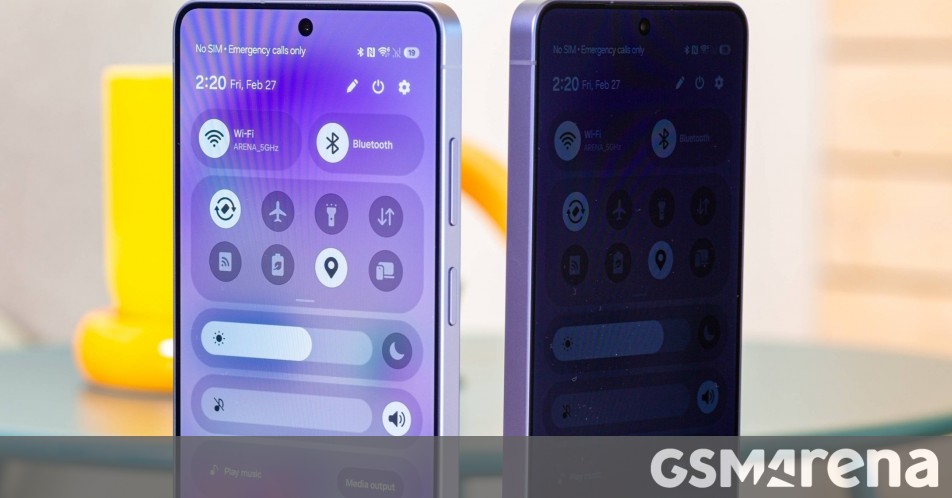
Pixel Density Shift: With Privacy Display on, fewer pixels light up, creating a subtle but noticeable difference in sharpness. However, with the feature off (its default state), the screens are virtually identical in color accuracy, brightness, and viewing angles.
-
Maximum Privacy Mode: This is the nuclear option. It not only reduces the viewing angle but also sacrifices contrast and color fidelity. Blacks turn gray, and the overall image quality takes a hit. It’s effective for maximum privacy but not ideal for everyday use.
Real-World Performance: Does It Deliver?
The Privacy Display is clever, but it’s not flawless. In standard Privacy Mode, someone standing next to you can still make out blurry shapes or text—it’s just much harder to read. Maximum Privacy Mode is far more effective, but the compromised viewing experience makes it impractical for regular use.
One of the smartest aspects of the feature is its context-awareness. It activates automatically for sensitive inputs like PINs, passwords, and pattern locks. It also works with notifications and can be set to trigger in specific apps or locations via Routines. However, it’s currently limited to system apps and the lock screen, with third-party support expected in future updates.
The Verdict: Innovation with Compromises
Samsung’s Privacy Display is a bold step forward in mobile security, offering a hardware-based solution that’s more seamless than a physical screen protector. But it comes with trade-offs: reduced brightness, potential impact on sharpness, and a less-than-perfect viewing angle in standard mode.
For those who prioritize privacy—especially in public spaces—it’s a valuable addition. But for the average user, it might feel like overkill. The real question is whether the convenience outweighs the compromises.
Viral Tags & Buzzworthy Phrases
-
SamsungGalaxyS26Ultra
-
PrivacyDisplay
-
ZeroPeekTech
-
MobilePrivacyRevolution
-
SamsungInnovation
- “The screen that hides from prying eyes”
- “Hardware-based privacy like never before”
- “Samsung’s secret weapon against screen snooping”
- “Is this the end of shoulder surfing?”
- “Privacy Display: The good, the bad, and the blurry”
- “Samsung’s bold bet on mobile security”
- “Does it work? We tested it so you don’t have to”
- “The tech behind the hype: Samsung’s Privacy Display explained”
- “Innovation or overkill? The S26 Ultra’s standout feature”
- “Samsung Galaxy S26 Ultra: A new era of mobile privacy”
,


Leave a Reply
Want to join the discussion?Feel free to contribute!