
Why you should mix your mechanical keyboard switches
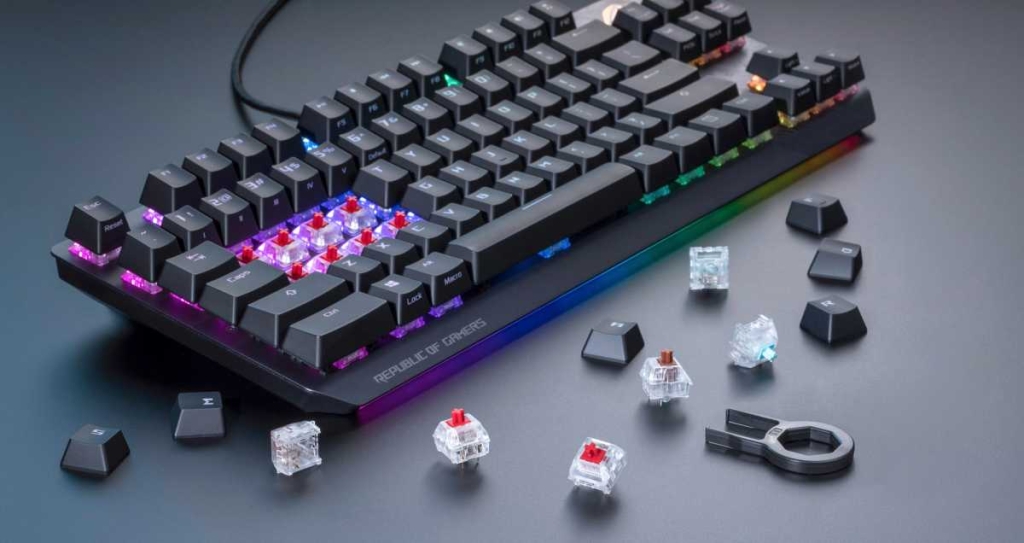
Mechanical Keyboards: The Art of Mixing Switches for a Truly Personalized Typing Experience
Mechanical keyboards have captivated enthusiasts worldwide with their unparalleled customization options, particularly when it comes to switch selection. While many users settle into a comfortable routine with a single switch type—whether it’s the smooth, linear feel of red switches or the tactile feedback of brown switches—there’s a whole world of possibilities waiting for those willing to experiment. Mixing different switch types isn’t just a novelty; it’s a sophisticated approach to creating a keyboard that’s perfectly tailored to your individual needs, whether you’re typing for hours on end, gaming intensely, or simply seeking the ultimate typing pleasure.
Understanding the Benefits of Switch Diversity
The beauty of mechanical keyboards lies in their modularity. Each switch type offers distinct characteristics in terms of actuation force, tactile feedback, sound profile, and overall feel. By strategically combining different switches across your keyboard, you can optimize specific zones for their intended use. For instance, you might prefer a softer, more forgiving switch for your space bar that reduces finger fatigue during extended typing sessions, while opting for a more precise, tactile switch in your WASD cluster for gaming where accuracy is paramount.
This zonal approach to switch selection allows you to create a keyboard that adapts to your workflow rather than forcing you to adapt to a one-size-fits-all solution. The space bar, being one of the most frequently used keys, often benefits from a lighter switch that requires less force to actuate, reducing strain during long typing sessions. Conversely, keys that serve critical functions—like Escape, Delete, or modifier keys—might benefit from switches with more pronounced tactile feedback to prevent accidental presses.
Tailoring Your Setup to Your Usage Patterns
The first step in creating your mixed-switch masterpiece is honest self-assessment. Are you primarily a typist who spends hours crafting documents and emails? A gamer who needs lightning-fast response times? Or perhaps a programmer who switches between intense coding sessions and casual web browsing? Your primary use case should guide your switch selection strategy.
For dedicated typists, tactile switches with a medium actuation force often provide the best balance of feedback and comfort. The subtle bump as you press the key confirms actuation without the need for bottoming out, potentially reducing typing fatigue. However, you might want to consider linear switches for frequently used keys like the space bar or Enter key, where a smooth, consistent press feels more natural.
Gamers face different priorities. The WASD cluster or arrow keys—the virtual movement controls for most games—benefit from switches with minimal actuation distance and consistent linear travel. Red or yellow switches, known for their light actuation force and smooth keystrokes, excel in these gaming hotspots. Meanwhile, the remaining keys can feature tactile or even clicky switches for satisfying feedback during menu navigation or chat interactions.
The Hot-Swap Advantage: Experimentation Without Commitment
One of the most significant advancements in mechanical keyboard technology has been the widespread adoption of hot-swap sockets. These ingenious little components allow you to swap switches without soldering, transforming what was once a permanent modification into a flexible, iterative process. This democratization of customization means you can experiment with different switch combinations without the commitment or technical expertise required for traditional soldering.
When beginning your mixing journey, start small. Consider swapping just your most frequently used keys or a single keyboard zone. This approach allows you to gauge how different switch types feel in practice without overwhelming yourself with a complete keyboard overhaul. Many enthusiasts find that starting with function keys, arrow keys, or the number pad provides valuable insight into how different switches complement each other.
The hot-swap method also enables seasonal or use-case-specific configurations. You might prefer tactile switches for your daily work setup but switch to linear switches for weekend gaming sessions. Some users even maintain multiple switch sets, allowing them to transform their keyboard’s personality in minutes rather than investing in multiple keyboards.
Technical Considerations: Actuation Force and Trigger Points
Creating a harmonious mixed-switch keyboard requires attention to technical details that might not be apparent to casual users. Actuation force—the amount of pressure required to register a keystroke—varies significantly between switch types. Cherry MX Red switches typically require around 45 grams of force, while tactile brown switches might need 55 grams, and clicky blue switches often demand 60 grams or more.
These differences can create an inconsistent typing experience if not carefully considered. A keyboard with widely varying actuation forces might feel disjointed, with some keys requiring noticeably more effort than others. The goal is to create a cohesive feel across the keyboard, even when using different switch types. This often means selecting switches with similar actuation forces or strategically placing higher-force switches where deliberate presses are beneficial (like Escape or Delete keys) and lower-force switches where rapid, repeated keystrokes occur (like space bar or Enter).
Trigger points—the distance at which a keystroke is registered—also vary between switches. Most mechanical switches register at the bottom of their travel, but some specialized switches offer adjustable trigger points or optical actuation. Understanding these nuances helps in creating a keyboard where all keys feel responsive and consistent, regardless of their switch type.
Sound Profiles: The Acoustic Dimension of Switch Mixing
The auditory experience of typing is often overlooked but plays a crucial role in user satisfaction. Different switch types produce distinctly different sound profiles, from the quiet, thocky sound of certain linear switches to the crisp, high-pitched click of blue switches. When mixing switches, you’re not just creating a tactile experience but also an acoustic landscape.
If you love the satisfying click of blue switches but find a full keyboard of them overwhelming, consider using them sparingly—perhaps only for modifier keys or the number row. This creates acoustic highlights without the constant clicking that some find fatiguing during long typing sessions. Conversely, if you prefer a quieter typing experience but want some auditory feedback, tactile brown switches offer a subtle bump sound that’s significantly quieter than clicky alternatives.
Advanced users often employ additional sound-dampening techniques like O-rings, switch films, or case modifications to further refine their keyboard’s acoustic signature. These modifications can help create a more cohesive sound profile even when using different switch types, ensuring that your mixed-switch keyboard sounds as good as it feels.
The Practical Process: Swapping Switches Like a Pro
Converting your keyboard to a mixed-switch setup is more straightforward than many assume, especially with hot-swap technology. The process begins with removing keycaps using a wire keycap puller, which prevents damage to both the caps and the switches beneath. Once the keycaps are removed, a switch puller allows you to gently extract the existing switches from their sockets.
When inserting new switches, alignment is crucial. The switch must be oriented correctly with its metal pins fitting into the hot-swap socket. Gentle, even pressure should be applied until you feel the switch click into place. Avoid excessive force, which could damage the switch or the socket. It’s worth noting that some switches, particularly those with PCB-mounted stabilizers, may require slight wiggling to seat properly.
After installation, thorough testing is essential. Use online keyboard testers or built-in operating system keyboard viewers to verify that each switch registers correctly and that no pins were bent during installation. This testing phase is also an excellent opportunity to evaluate how your new switch combination feels in practice, allowing for adjustments before finalizing your configuration.
Advanced Customization: Beyond Basic Switch Swapping
For those ready to dive deeper into keyboard customization, the switch-mixing journey doesn’t end with simple hot-swapping. Many enthusiasts explore switch lubing—applying specialized lubricants to switch components to reduce friction and modify both feel and sound. This process can transform the typing experience, making even budget switches feel premium and reducing the audible “scratch” that some switches exhibit when new.
Switch films—thin, precision-cut layers placed inside switches— can further enhance stability and reduce wobble, creating a more solid typing feel. When combining these advanced techniques with strategic switch mixing, you can achieve a level of customization that rivals professional-grade keyboards costing hundreds of dollars more.
Some users even explore custom switch creation, combining stems, springs, and housings from different manufacturers to create unique hybrid switches. While this approach requires significant expertise and experimentation, it represents the pinnacle of keyboard personalization, allowing for truly one-of-a-kind typing experiences.
The Community Aspect: Learning and Sharing
The mechanical keyboard community is renowned for its collaborative spirit and wealth of shared knowledge. Online forums, social media groups, and dedicated websites offer endless resources for those interested in switch mixing. From detailed switch reviews and comparison videos to step-by-step modification guides, the collective wisdom of enthusiasts worldwide is available to help you on your customization journey.
Many users document their switch-mixing experiments, sharing both successes and failures. These real-world experiences can provide valuable insights into which switch combinations work well together and which might create an inconsistent or uncomfortable typing experience. Some enthusiasts even create switch-mixing templates or recommendations based on specific use cases, providing a starting point for those new to the concept.
The community also facilitates switch trading and group buys, making it more affordable to experiment with different switch types. Rather than purchasing full boxes of multiple switch types, users can often acquire smaller quantities through community exchanges, reducing the financial barrier to entry for switch experimentation.
The Ultimate Reward: A Keyboard That’s Uniquely Yours
The true beauty of mixing mechanical switches lies in creating a tool that’s perfectly aligned with your needs and preferences. Unlike mass-produced keyboards that prioritize cost-effectiveness over user experience, a thoughtfully mixed-switch keyboard becomes an extension of your hands and mind. Whether you’re a programmer who values consistent tactile feedback, a writer who needs comfortable, fatigue-free typing, or a gamer who demands split-second responsiveness, switch mixing allows you to optimize every keystroke.
This level of personalization extends beyond mere functionality. A mixed-switch keyboard becomes a statement piece, a conversation starter, and a source of pride for its creator. Each switch choice tells a story about your priorities and preferences, creating a device that’s as unique as your fingerprint.
Moreover, the skills and knowledge gained through switch mixing often spark interest in broader aspects of keyboard customization, from artisan keycaps to custom case design. What begins as a simple experiment in switch diversity can evolve into a passionate hobby that combines technical skill, aesthetic sensibility, and personal expression.
Final Thoughts: Embracing the Experimental Mindset
Mixing mechanical switches isn’t about following rigid rules or achieving some mythical “perfect” configuration. It’s about embracing experimentation, learning through hands-on experience, and ultimately creating something that brings you joy every time you sit down to type. The journey might involve some trial and error, unexpected discoveries, and perhaps a few switches that didn’t work out as planned. But each step brings you closer to understanding your preferences and developing the skills to create increasingly refined typing experiences.
In a world of increasingly homogenized technology, where devices often feel designed by committee rather than for individuals, the ability to customize something as fundamental as your keyboard represents a form of digital self-expression. It’s a reminder that technology can be both functional and personal, both a tool and a reflection of its user’s unique needs and personality.
So whether you’re a curious newcomer or a seasoned enthusiast, consider exploring the world of switch mixing. Start small, learn continuously, and don’t be afraid to experiment. Your perfect typing experience awaits, one switch at a time.
#MechanicalKeyboards #SwitchMixing #KeyboardCustomization #HotSwap #TypingExperience #GamingKeyboards #PCGaming #TechDIY #KeyboardEnthusiasts #MechanicalSwitches #SwitchModding #KeyboardBuilding #TechCustomization #TypingOptimization #GamingSetup #KeyboardModding #SwitchLubing #KeyboardSound #TechCommunity #DIYKeyboards
“Transform your typing experience with strategic switch mixing”
“Create a keyboard that adapts to your unique workflow”
“Discover the art of zonal switch optimization”
“Unlock the full potential of your mechanical keyboard”
“Experience typing nirvana through thoughtful customization”
“Level up your gaming setup with tactical switch selection”
“Build a keyboard that’s as unique as your fingerprint”
“Join the revolution of personalized typing experiences”
“Turn your keyboard into a precision instrument”
“Find your perfect keystroke through experimentation”,

Leave a Reply
Want to join the discussion?Feel free to contribute!