
Your Android phone’s most powerful security feature is off by default and hidden – turn it on ASAP
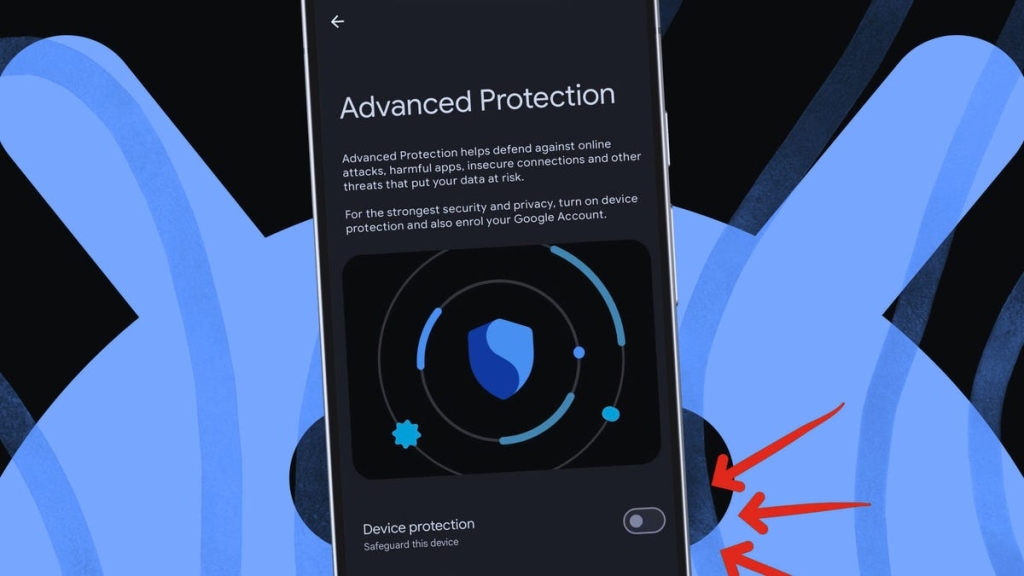
Google’s Advanced Protection for Android: The Ultimate Shield for Your Smartphone
In an era where our smartphones are the digital keys to our lives—holding everything from banking apps and private messages to work documents and personal photos—security isn’t just a feature; it’s a necessity. Google has just rolled out a powerful new defense mechanism for Android users: Advanced Protection. This isn’t your average toggle. It’s a comprehensive, all-in-one security suite that bundles critical protections across six major categories and locks them down so tightly that even the most determined cyber threats will have a hard time getting through.
But what exactly is Advanced Protection? How does it work? And why isn’t it turned on by default? Let’s dive deep into this game-changing feature that could redefine mobile security as we know it.
What Is Advanced Protection on Android?
Advanced Protection is Google’s answer to the growing sophistication of digital threats. It consolidates a wide array of security settings—spanning Apps, Device Safety, Messages, Network, Phone, and Web—into a single, powerful switch. Once activated, this switch locks all these settings in place, making it impossible to disable them individually. It also activates additional, enhanced protections that go beyond the standard Android security features.
Think of it as putting your phone in a digital fortress. The gates are closed, the drawbridge is up, and the guards are on high alert. And the best part? You don’t have to be a cybersecurity expert to use it. Google has made it simple: one switch, maximum protection.
What Does Advanced Protection Actually Do?
Let’s break down the specific protections that Advanced Protection enables on your device:
Apps
- Unknown app blocking: Prevents the installation of apps from sources outside the Google Play Store. This is a major defense against malware that often sneaks in through sideloaded apps.
Device Safety
- Theft Detection Lock: Uses AI to detect if your phone is suddenly grabbed or moved in a suspicious way, automatically locking the device.
- Offline Device Lock: Locks your phone if it loses network connection, preventing unauthorized access.
- Inactivity Reboot: Forces a reboot if the phone remains locked for 72 hours, adding an extra layer of security.
Messages
- Spam and scam protection: Filters and flags harmful texts, keeping phishing attempts and scams at bay.
- Unsafe links: Warns you about suspicious links from unknown senders, preventing you from accidentally clicking on malicious URLs.
Network
- 2G network protection: Blocks your phone from connecting to insecure 2G networks (on supported devices), reducing the risk of interception.
Phone
- Enhanced call screening: Automatically screens spam and scam calls, so you don’t have to.
Web
- Safe browsing: Blocks phishing and malicious websites, keeping you safe while surfing the web.
- Chrome HTTPS enforcement: Forces HTTPS whenever possible, ensuring your data is encrypted.
- JavaScript protections: Disables Chrome’s JavaScript optimizer to reduce attack risks, making it harder for hackers to exploit vulnerabilities.
Why Isn’t Advanced Protection Enabled by Default?
You might be wondering: if Advanced Protection is so powerful, why isn’t it turned on by default for everyone? The answer lies in the balance between security and usability.
Some features, like blocking sideloaded apps or automatically screening calls, can cause issues for certain users. For example, if you rely on apps from third-party sources (like beta testers or developers), blocking sideloaded apps could be a dealbreaker. Similarly, aggressive call screening might accidentally block legitimate calls.
Google has chosen to make Advanced Protection optional, allowing users to decide if they want the extra security. It’s a thoughtful approach that respects user choice while still offering the highest level of protection for those who need it.
Does Advanced Protection Block Sideloaded Apps?
Yes. One of the most significant changes Advanced Protection makes is blocking the installation of apps from unknown sources. This means you can’t sideload apps outside the Google Play Store while it’s enabled. While this might be inconvenient for some users, it’s a crucial defense against malware, which often spreads through unofficial app stores or direct downloads.
Will Advanced Protection Slow Down My Phone?
Not noticeably. Advanced Protection is designed to run seamlessly in the background, without impacting your phone’s performance. The biggest trade-offs are losing the ability to sideload apps and occasional issues with spam and call screening. For most users, these are small prices to pay for the added security.
What Exactly Happens If My Phone Is Stolen?
If your phone is stolen, Advanced Protection kicks into high gear. Here’s how it helps:
- Theft Detection Lock: Automatically locks your phone if it’s grabbed or moved suddenly, preventing the thief from accessing your data.
- Offline Device Lock: Locks the device if it loses network connection, making it useless to anyone without your credentials.
- Inactivity Reboot: Forces a reboot if the phone stays locked for 72 hours, adding an extra layer of security.
These features work together to make your stolen phone as good as useless to anyone who doesn’t have your password or biometric credentials.
Do I Need Google Account Advanced Protection?
While Advanced Protection for Android focuses on your device, Google Account Advanced Protection is a separate program that secures your online account (Gmail, Drive, Docs, and more). It’s an opt-in program that requires stronger sign-in methods, such as passkeys or physical security keys, and limits third-party access to your data.
If you’re at high risk—such as journalists, activists, or anyone handling sensitive information—both Android’s Advanced Protection and Google Account Advanced Protection are worth enabling. Together, they provide the highest level of security for your device and your online data.
Final Thoughts: Is Advanced Protection Worth It?
In a world where cyber threats are becoming more sophisticated every day, Advanced Protection is a game-changer. It’s not just about keeping your phone safe; it’s about protecting your digital life. Whether you’re a casual user or someone handling sensitive information, Advanced Protection offers peace of mind that your data is secure.
So, is it worth it? Absolutely. In the digital age, security isn’t a luxury—it’s a necessity. And with Advanced Protection, Google has made it easier than ever to stay safe.
Tags & Viral Phrases:
- Advanced Protection Android
- Google Advanced Protection
- Android security features
- Protect your phone from theft
- Block sideloaded apps
- Safe browsing Android
- Theft Detection Lock
- Offline Device Lock
- Inactivity Reboot
- Spam and scam protection
- 2G network protection
- Chrome HTTPS enforcement
- JavaScript protections
- Google Account Advanced Protection
- Passkeys and security keys
- Mobile security 2025
- Ultimate Android security
- Digital fortress for your phone
- Cybersecurity made simple
- Protect your digital life
- One switch, maximum protection
- Game-changing security feature
- Stay safe online
- High-risk user security
- Journalists and activists security
- Sensitive information protection
- Peace of mind with Advanced Protection
- Cybersecurity necessity
- Digital keys to your life
- Sophisticated cyber threats
- Balance between security and usability
- Crucial defense against malware
- Seamless background security
- Small prices for added security
- High gear security features
- Digital life protection
- Cybersecurity luxury
- Easier than ever to stay safe
,


Leave a Reply
Want to join the discussion?Feel free to contribute!