
Your Chrome browser just got three huge upgrades – including a genius tab split-view mode
Google Chrome Gets Productivity Boost with Three New Features—No AI Required
In a surprising move that bucks the current AI-centric trend, Google has unveiled three new productivity-focused features for its Chrome browser, none of which rely on artificial intelligence. The updates, announced this week, aim to streamline everyday tasks and enhance user workflow without the complexity of AI integration.
Chrome’s Latest Features: A Return to Simplicity
Google’s latest additions to Chrome focus on practical functionality that addresses common user pain points. From PDF management to multitasking capabilities, these updates demonstrate Google’s commitment to improving the browsing experience through thoughtful, user-centric design.
1. Automatic Google Drive Backup for PDFs
One of the most welcome additions is Chrome’s new automatic PDF backup feature. When enabled, any PDF you download will be automatically saved to your Google Drive in a dedicated “Saved from Chrome” folder. This eliminates the frustrating experience of losing track of important documents after downloading them.
The feature offers several advantages:
- Instant cloud backup: Your PDFs are immediately secured in the cloud
- Cross-device accessibility: Access your documents from any device, anywhere
- Organizational clarity: All PDFs are automatically categorized in a dedicated folder
- Space efficiency: Reduces clutter on your local device storage
This is particularly valuable for professionals who frequently download contracts, reports, or forms that need to be accessed across multiple devices throughout the workday.
2. Split View Multitasking
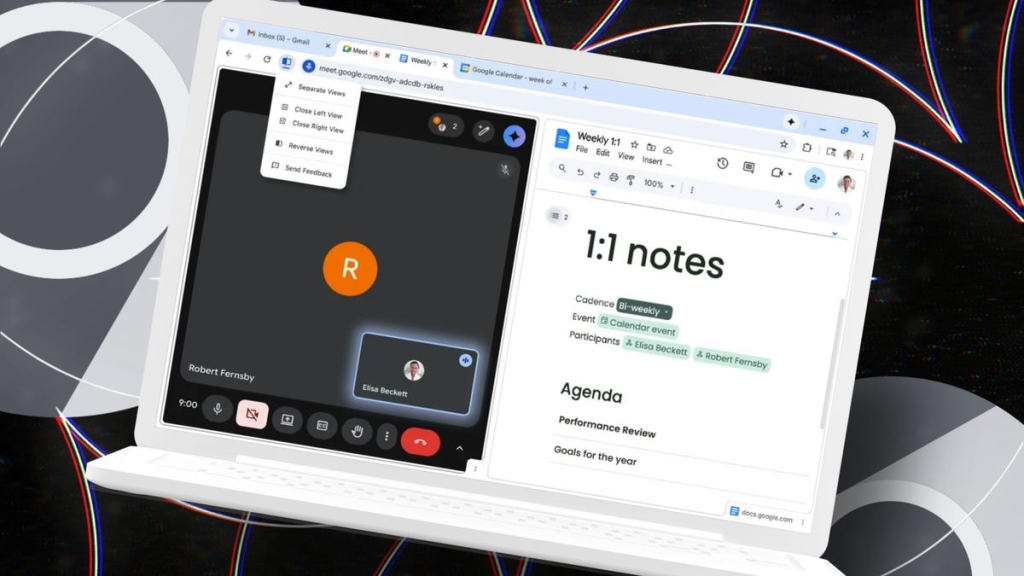
Chrome’s new split view feature addresses one of the most common productivity challenges: the need to reference multiple sources simultaneously. By allowing users to view two tabs side-by-side in a single browser window, Chrome eliminates the constant tab-switching that disrupts workflow.
To activate split view, simply drag a tab to the left or right edge of your browser window, or right-click any link and select “Open Link in Split View.” The split can be resized to allocate more space to the more important content.
Use cases highlighted by Google include:
- Taking notes while watching an instructional video
- Grading student assignments while entering grades into a spreadsheet
- Referencing documentation while writing code
- Comparing product specifications side by side while shopping
While Windows offers similar functionality through its built-in window management, Chrome’s split view keeps everything within the browser environment, creating a more seamless experience.
3. In-Browser PDF Annotations
The third new feature transforms Chrome’s PDF viewer into a more robust tool by enabling annotations without requiring downloads. Users can now add digital signatures, fill out forms, and write notes directly in their browser—no additional software or downloads required.
This enhancement makes Chrome’s PDF viewer genuinely useful for:
- Quick digital signatures on contracts and agreements
- Reviewing and annotating work reports
- Making notes on class syllabi or reading materials
- Adding comments to important documents for collaboration
The feature maintains the security and convenience of in-browser viewing while adding functionality that previously required dedicated PDF editing software.
Why These Updates Matter
What makes these features particularly noteworthy is their deliberate avoidance of AI technology. In an era where tech companies are racing to embed AI into every possible feature, Google’s decision to focus on straightforward, practical tools demonstrates an understanding that sometimes the best solution isn’t the most technologically advanced one—it’s the one that simply works.
These updates reflect a user-centric approach that prioritizes solving real problems over showcasing technological capabilities. For many users, the ability to quickly sign a document, view two sources simultaneously, or ensure important files are backed up is far more valuable than yet another AI-powered feature they may never use.
Availability
All three features are rolling out now to users with the latest version of Chrome. To ensure you have access to these productivity boosters, make sure your browser is updated to the most recent version through Chrome’s settings menu.
Google’s latest Chrome enhancements prove that sometimes the most impactful innovations are the ones that make our daily digital interactions just a little bit smoother—no AI required.
Tags & Viral Phrases:
- Google Chrome new features 2024
- Chrome productivity tools
- No AI Chrome updates
- Chrome split view multitasking
- Automatic PDF backup Google Drive
- In-browser PDF annotations
- Chrome PDF viewer improvements
- Google browser productivity
- Chrome features without AI
- Split screen Chrome browsing
- PDF management Chrome
- Chrome multitasking capabilities
- Google Drive PDF integration
- Browser productivity hacks
- Chrome updates 2024
- Google Chrome split view
- PDF annotation browser
- Chrome features without machine learning
- Browser productivity enhancements
- Google Chrome new tools
,


Leave a Reply
Want to join the discussion?Feel free to contribute!