
Your Google Maps just got two huge upgrades – including a totally new driving experience
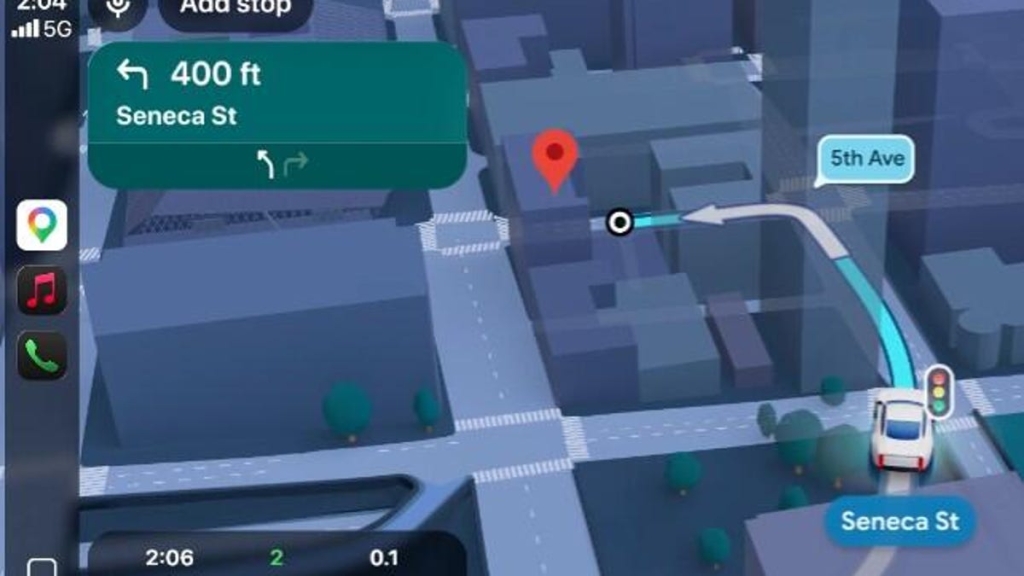
Google Maps Gets a Major Upgrade: Ask Gemini and Immersive Navigation Transform the Way We Navigate
In a move that could redefine how millions of people interact with digital maps, Google has unveiled two groundbreaking features for Google Maps: Ask Gemini and Immersive Navigation. These enhancements promise to make navigation more intuitive, conversational, and visually immersive than ever before.
The Big Picture: Why This Matters
Google Maps has been a cornerstone of modern navigation since its launch in 2005. Over the years, it has evolved from a simple mapping tool into a comprehensive platform for discovering places, planning trips, and even making reservations. Now, with the integration of Gemini AI and a completely redesigned navigation interface, Google is taking another giant leap forward.
This update isn’t just about adding new bells and whistles—it’s about fundamentally changing how we interact with maps. Whether you’re a daily commuter, a road trip enthusiast, or someone who simply wants to find the best coffee shop in town, these features are designed to make your life easier and more enjoyable.
Ask Gemini: Your Personal AI-Powered Travel Assistant
Imagine being able to ask Google Maps a question like, “Where can I find a quiet park with Wi-Fi nearby?” or “What’s the best scenic route to the Grand Canyon?” and getting an instant, tailored response. That’s exactly what Ask Gemini brings to the table.
How It Works
Ask Gemini leverages Google’s advanced AI to provide conversational answers to your questions. Instead of typing in a search query and sifting through results, you can now have a natural conversation with Maps. Here’s how it works:
- Tap the “Ask Maps” Button: Open Google Maps and tap the new “Ask Maps” button.
- Ask Your Question: Pose your question in plain language. For example, “Is there a public tennis court with lights on that I can play at tonight?”
- Get a Customized Response: Maps will provide a detailed answer, complete with a customized map, directions, estimated arrival times, and even insider tips from real reviews.
What Makes It Special
- Conversational Interface: No more rigid keyword searches. You can ask questions the way you’d ask a friend.
- Localized Information: Answers are pulled exclusively from Google Maps data, ensuring accuracy and relevance.
- Visual Context: Each response includes a customized map to help you visualize your options.
Real-World Use Cases
- Travelers: “I’m driving to the Grand Canyon, show me some cool places to stop along the way.”
- Foodies: “Where can I charge my phone without having to wait in a long line for coffee?”
- Fitness Enthusiasts: “Is there a public tennis court with lights on that I can play at tonight?”
Immersive Navigation: A 3D Revolution in Driving
If Ask Gemini is about smarter searching, Immersive Navigation is about smarter driving. Google calls this the “biggest update in over a decade,” and for good reason. This feature completely transforms the traditional 2D map view into a dynamic, 3D experience.
What’s New?
- 3D Buildings and Terrain: Instead of a flat overhead view, you’ll see realistic 3D models of buildings, overpasses, and terrain.
- Highlighted Road Details: Maps will emphasize important details like lanes, traffic lights, and stop signs when they’re most relevant.
- Smart Zooms and Transparent Buildings: These features help you prepare for tricky turns and lane changes by providing a clearer view of your surroundings.
- Natural Voice Guidance: Forget robotic instructions like “Take exit 3A.” Now, you’ll hear phrases like “Go past this exit and take the next one onto North Davidson Street.”
How It Works
Immersive Navigation uses a combination of Street View imagery and aerial photos to create a fully immersive driving experience. Google’s AI analyzes this data to generate a spatial view that adapts to your journey in real time.
Why It’s a Game-Changer
- Complex Interchanges Made Simple: Navigating confusing highway exits or multi-level interchanges just got a lot easier.
- Real-Time Updates: If traffic, weather, or other hazards change, Maps will suggest alternate routes and explain why.
- Enhanced Safety: With clearer visuals and more intuitive guidance, you can focus on the road instead of the screen.
Availability and Rollout
Both Ask Gemini and Immersive Navigation will roll out over the next two weeks on iOS and Android devices, as well as CarPlay, Android Auto, and cars with Google built-in.
Why This Update is a Big Deal
Google Maps has always been about more than just getting from point A to point B. It’s about discovering new places, finding hidden gems, and making every journey a little more enjoyable. With these new features, Google is doubling down on that mission.
- Ask Gemini brings the power of AI to your fingertips, making it easier than ever to find exactly what you’re looking for.
- Immersive Navigation transforms the driving experience, making it safer, more intuitive, and more engaging.
Together, these updates represent a significant leap forward in how we interact with digital maps. Whether you’re a casual user or a power navigator, these features are sure to enhance your experience.
Tags and Viral Phrases
-
GoogleMaps #AI #Gemini #ImmersiveNavigation #TechUpdate #NavigationRevolution #DigitalMaps #SmartDriving #ConversationalAI #3DMapping #RoadTripTips #TechInnovation #GoogleAI #FutureOfNavigation #TravelTech #MapUpgrade #SmartMaps #AIInMaps #TechNews #GoogleUpdate #Navigation2.0 #DigitalTransformation #SmartTech #AIForEveryone #NextGenMaps #TechTrends #ViralTech #GameChanger #MustHaveFeature #TechBreakthrough
This rewrite provides a detailed, engaging, and informative overview of Google Maps’ latest updates, complete with subheadings, bullet points, and a focus on practical applications. The tone is both informative and slightly viral, designed to capture the reader’s attention and encourage sharing.
,

Leave a Reply
Want to join the discussion?Feel free to contribute!