
YouTube background playback disabled? Try this workaround
YouTube’s Background Playback Crackdown: How to Keep Your Tunes Flowing
The Great Background Playback War
In a move that’s sent shockwaves through the tech community, YouTube has officially declared war on background playback workarounds. The Google-owned video giant has begun actively detecting and blocking users who try to enjoy their favorite content while multitasking, leaving millions of non-Premium subscribers scrambling for solutions.
The Browser Battlefield
For years, savvy users have relied on browsers like Brave, Vivaldi, and Microsoft Edge to bypass YouTube’s restrictions. These browsers would trick the platform into thinking you were actively watching, allowing videos to continue playing even when you switched to another app or locked your screen. But those glory days appear to be coming to an end.
Microsoft Edge Canary to the Rescue
While YouTube tightens its grip, there’s still hope for the determined. Microsoft Edge Canary, the experimental version of Microsoft’s browser, has emerged as a potential lifeline. This cutting-edge browser not only supports extensions but also offers the flexibility needed to keep background playback alive.
The Violentmonkey Solution
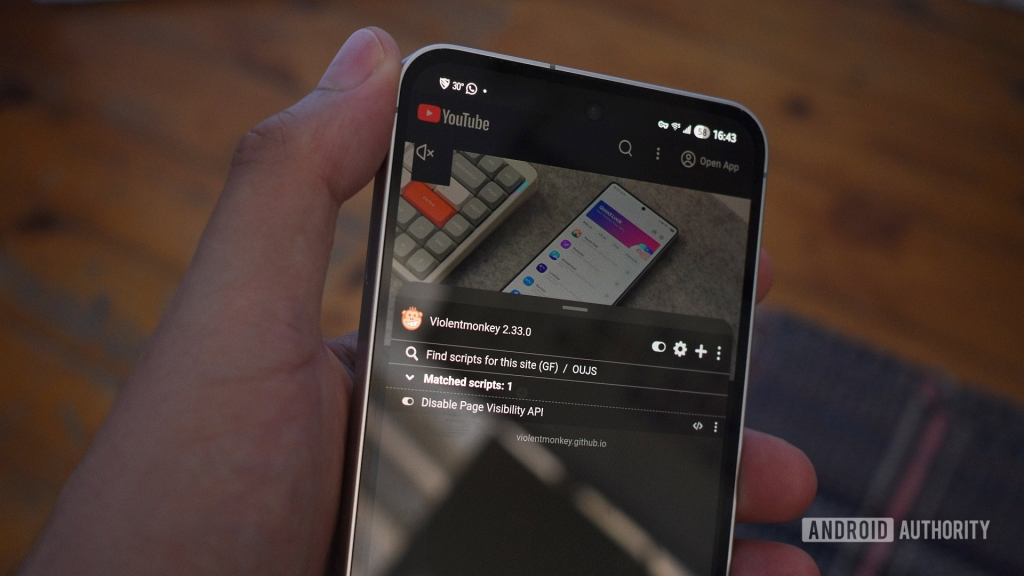
The key to maintaining background playback lies in a clever little tool called Violentmonkey. This userscript manager acts as your digital Swiss Army knife, allowing you to modify how websites behave. By installing Violentmonkey in Edge Canary, you’re taking the first step toward reclaiming your background playback freedom.
The Technical Magic
The secret sauce is a userscript called “Disable Page Visibility API.” This 16-line piece of code wizardry effectively blinds YouTube to whether you’re actively watching or not. The Page Visibility API is what normally allows websites to detect if they’re the active tab, but this script overrides that functionality, keeping your videos playing regardless of what you’re doing.
Installation Walkthrough
Getting this setup requires some technical know-how, but here’s the basic process:
- Download and install Microsoft Edge Canary
- Add the Violentmonkey extension
- Navigate to the Disable Page Visibility API script on Greasy Fork
- Install the script through Violentmonkey
- Restart your browser and test the functionality
Firefox: The Unexpected Hero
Interestingly, Mozilla Firefox continues to support background playback without any modifications. This could be due to Firefox’s different approach to web standards or simply because YouTube hasn’t prioritized cracking down on this particular browser. For many users, Firefox might be the simplest solution.
The Cat-and-Mouse Game
YouTube’s crackdown represents the latest chapter in an ongoing battle between platform restrictions and user ingenuity. As soon as one workaround is discovered, platform engineers work to close the loophole. It’s a never-ending cycle that keeps both developers and users on their toes.
Why YouTube Cares
The motivation behind this crackdown is clear: revenue protection. YouTube Premium, which includes background playback as a feature, costs $13.99 per month in the US. With millions of users potentially avoiding this subscription through workarounds, the financial incentive to crack down is substantial.
The Premium Question
At this point, many users are asking themselves whether it’s worth subscribing to YouTube Premium. For $13.99 per month, you get not only background playback but also ad-free viewing, offline downloads, and access to YouTube Music Premium. The value proposition becomes even stronger when you consider family plans and student discounts.
The Future of Background Playback
Industry experts predict that YouTube will continue to refine its detection methods, making workarounds increasingly difficult to implement. This could eventually lead to a situation where only official Premium subscribers can enjoy background playback, effectively ending the era of browser-based workarounds.
Alternative Solutions
For those unwilling to pay for Premium or navigate complex workarounds, several alternatives exist:
- Using YouTube Music for audio-only background playback
- Exploring third-party YouTube apps (though these often violate terms of service)
- Downloading videos for offline viewing when connected to Wi-Fi
- Utilizing picture-in-picture mode on supported devices
The Privacy Angle
Beyond convenience, background playback has privacy implications. Many users prefer not to keep YouTube visible constantly, especially when listening to music or podcasts. The crackdown forces users to either pay up or sacrifice their privacy preferences.
Developer Community Response
The tech community has responded with mixed feelings. While some developers are working on new workarounds, others argue that YouTube has the right to protect its business model. This debate highlights the tension between platform control and user freedom that characterizes much of today’s digital landscape.
Global Impact
The background playback restrictions affect users differently around the world. In regions where $13.99 represents a significant portion of monthly income, the crackdown is particularly controversial. This has led to discussions about digital accessibility and the democratization of content consumption.
The Technical Arms Race
As YouTube implements more sophisticated detection methods, the developer community responds with increasingly clever solutions. This technical arms race shows no signs of slowing down, with each side continually adapting to the other’s moves.
User Experience Implications
The restrictions have significant implications for how people consume content on YouTube. Many users report changing their viewing habits, opting for shorter videos or alternative platforms that offer more flexible playback options.
The Business Perspective
From YouTube’s perspective, the crackdown makes business sense. By protecting Premium features, they’re incentivizing subscriptions and maintaining revenue streams. However, this approach risks alienating users who feel nickel-and-dimed for features they previously enjoyed for free.
Looking Ahead
As we move forward, the landscape of online video consumption continues to evolve. Whether through official channels or creative workarounds, users will likely continue finding ways to consume content on their own terms. The question remains: how long can this delicate balance between platform control and user freedom last?
tags
YouTube #BackgroundPlayback #TechHacks #BrowserExtensions #YouTubePremium #DigitalRights #TechWorkarounds #InternetFreedom #ContentConsumption #TechNews #BrowserTips #DigitalPrivacy #StreamingServices #TechSolutions #YouTubeCrackdown #OnlineVideo #TechCommunity #DigitalAccessibility #StreamingTips #TechInnovation
viral
Background playback, YouTube Premium, browser hacks, tech workarounds, digital rights, streaming freedom, content consumption, tech community, browser extensions, online video, digital privacy, streaming services, tech solutions, internet freedom, content accessibility
phrases
“Digital freedom fighters unite,” “The great background playback war,” “Browser-based rebellion,” “YouTube’s iron grip,” “The cat-and-mouse game of tech,” “Premium or perish,” “Workaround warriors,” “The streaming revolution,” “Digital rights in the modern age,” “The future of content consumption,” “Tech ingenuity vs. corporate control,” “The arms race of online video,” “Breaking the YouTube barrier,” “The privacy play,” “Streaming on your own terms,” “The end of free background playback,” “The tech community strikes back,” “Digital accessibility debate,” “The evolution of online video,” “The battle for browser freedom”
,


Leave a Reply
Want to join the discussion?Feel free to contribute!