
Google announces ‘Skills’ for Gemini in Chrome to run workflows
Google Chrome’s New Gemini Skills Feature: One-Click AI Workflows Are Here to Revolutionize Your Browsing Experience
In a bold move to enhance user productivity and showcase the full potential of its AI assistant, Google has just rolled out a game-changing feature for Gemini in Chrome on desktop: Skills. This innovative addition allows users to execute frequently used prompts with a single keystroke, transforming the way we interact with AI while browsing the web.
What Are Gemini Skills?
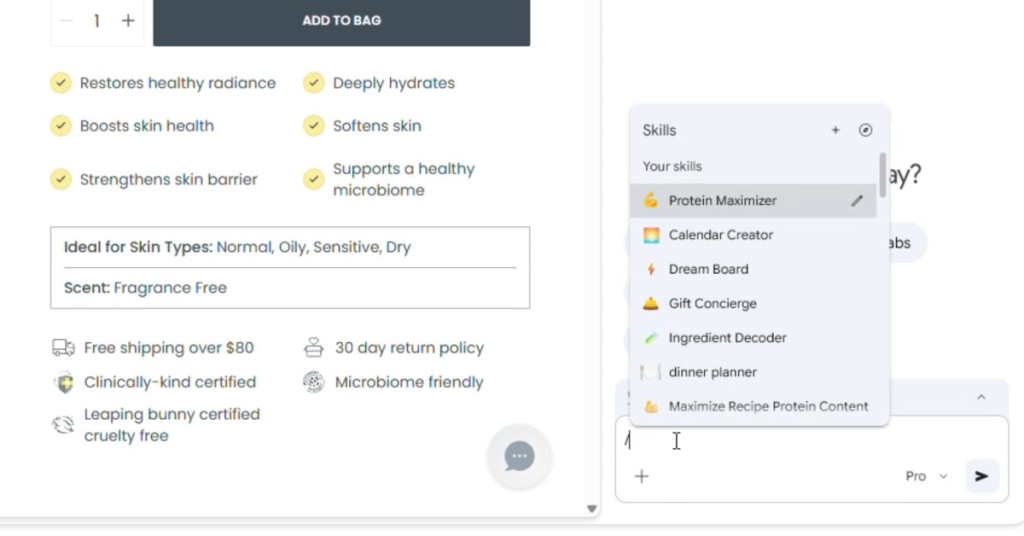
Imagine having a personal AI assistant that anticipates your needs and executes complex tasks with just a forward slash (/) and a click. That’s exactly what Skills brings to the table. These are one-click workflows that you can invoke directly from the prompt box in Gemini. Whether you’re researching, shopping, or just trying to make sense of a dense document, Skills are designed to save you time and effort.
How It Works
- Quick Access: Simply type a forward slash (
/) in the Gemini prompt box to bring up your saved Skills. - Contextual Execution: Skills run on the current webpage you’re viewing and can even pull data from other selected tabs (just hit the ‘+’ button to add more).
- Save and Reuse: After a productive chat with Gemini, you’ll be prompted to save the workflow as a Skill for future use. You can even customize the name and add an emoji for easy identification.
A Library of Possibilities
Google isn’t just leaving you to figure it all out on your own. They’ve curated a library of pre-built Skills available at chrome://skills/browse. These cover a wide range of categories including:
- Learning: Quickly summarize articles or generate study guides.
- Research: Cross-reference information across multiple tabs.
- Shopping: Compare product specs side-by-side.
- Writing: Brainstorm ideas or refine your drafts.
Real-World Use Cases
- Health & Wellness: Calculate protein macros for any recipe in seconds.
- Shopping: Generate detailed spec comparisons across multiple product pages.
- Productivity: Scan lengthy documents to extract key information.
As Google puts it, “Want to break down the ingredients of a product you’re viewing online? Or select the perfect gift from multiple options by cross-referencing your budget with the recipient’s interests?” Skills make these tasks effortless.
Safety First
Google has also prioritized user safety. Skills that involve sensitive actions—like adding events to your calendar or sending emails—will always ask for your confirmation before proceeding. This ensures that automation doesn’t come at the cost of control.
Rolling Out Now
The Skills feature is rolling out starting today to Gemini in Chrome on desktop. And the best part? Your saved Skills are synced across all your signed-in Chrome devices, so you can access them wherever you go. To manage your Skills, simply type / in Gemini and click the compass icon.
Why This Matters
This isn’t just another incremental update—it’s a paradigm shift in how we interact with AI on the web. By lowering the barrier to entry for complex AI tasks, Google is making advanced technology accessible to everyone. Whether you’re a student, a professional, or just someone who loves to optimize their workflow, Skills are poised to become an indispensable part of your browsing experience.
So, are you ready to take your Chrome browsing to the next level? Dive into Gemini Skills today and discover a smarter, faster way to get things done.
Tags & Viral Phrases:
GeminiSkills #ChromeAI #GoogleAI #ProductivityHacks #TechInnovation #AIWorkflows #SmartBrowsing #OneClickAI #FutureOfBrowsing #GoogleChrome #AILibrary #TechNews #ViralTech #GameChanger #AIAssistant #SmartWorkflows #TechTrends #DigitalProductivity #AIForEveryone #ChromeUpdate #TechRevolution
,


Leave a Reply
Want to join the discussion?Feel free to contribute!