
How Google’s updated AI Mode will ease your tab clutter when you search
Google Chrome’s AI Mode Gets a Major Overhaul: Side-by-Side Browsing and Tab Search Arrive
In a bold move that’s set to redefine how we interact with search engines, Google has just rolled out a game-changing update to Chrome’s AI Mode. This isn’t just another incremental improvement—it’s a complete reimagining of the search experience, designed to eliminate tab clutter, boost productivity, and make AI-powered browsing more intuitive than ever.
The Big Picture: Why This Update Matters
For years, Google Search has been the go-to tool for finding information online. But as AI has become more integrated into our digital lives, the way we search has started to feel a bit… clunky. You type a query, get an AI-generated summary, click a link, and suddenly you’re drowning in a sea of tabs, trying to piece together information from multiple sources. It’s inefficient, distracting, and frankly, a little frustrating.
Google’s new AI Mode update is here to fix that. By introducing side-by-side browsing and the ability to search across your recent tabs, Chrome is taking a giant leap toward making AI-powered search not just smarter, but smarter to use.
Side-by-Side Browsing: The End of Tab Clutter
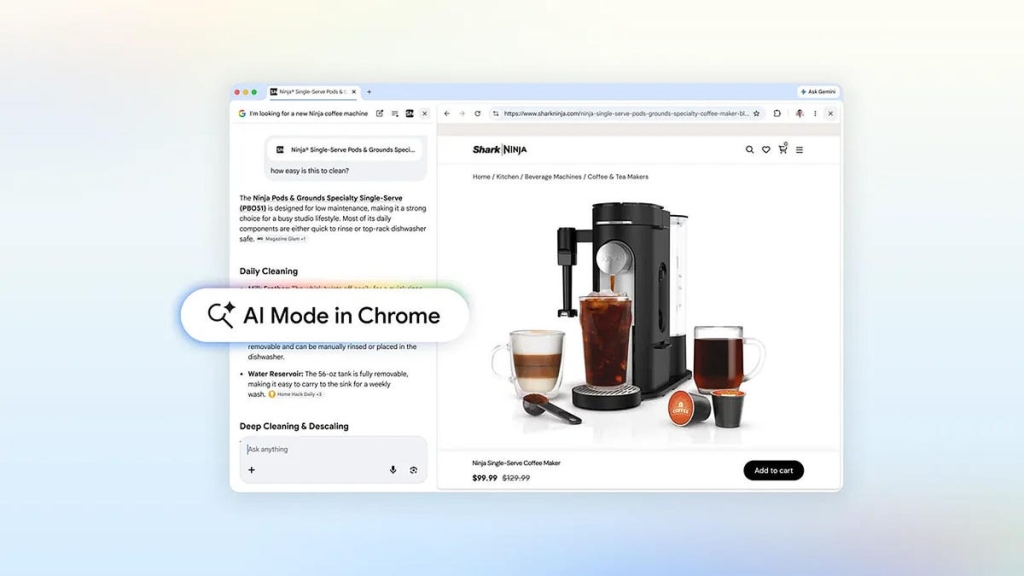
Let’s start with the headline feature: side-by-side browsing. When you click on a link in AI Mode, instead of opening a new tab and breaking your flow, the website now opens right next to your AI Mode window. This means you can view the search results and the webpage simultaneously, all on one screen.
Imagine you’re shopping for a coffee maker. You ask AI Mode to find one that fits your apartment and makes lattes. The AI summary pops up, along with links to retailers. Click on a link, and boom—the retailer’s website opens side-by-side with your AI Mode window. You can compare details, ask follow-up questions, and stay focused on your task without ever losing context.
Google says early testers loved this feature because it eliminated the need to constantly switch tabs. And honestly, who hasn’t felt the frustration of juggling a dozen tabs just to research a single topic? This update is a game-changer for anyone who’s ever felt overwhelmed by their browser.
Search Across Your Recent Tabs: A Productivity Boost
But Google didn’t stop there. The update also introduces the ability to search across your recent tabs. Here’s how it works: open a new tab, click the Plus menu in the AI Mode box, and select any of your recent tabs. Add them to your search, and you can now ask Google questions related to the content in those tabs.
Let’s say you’re studying for a test. Your tabs are filled with class notes, lecture slides, and academic papers, but you need more resources. Based on the content in those tabs, you can ask Google to suggest additional sites to visit. It’s like having a personal research assistant that knows exactly what you’re working on.
How to Get the Update
Excited to try these features? Here’s how to get started. First, make sure you’re running Chrome version 146.0.7680.174 or higher. To check, click the ellipsis icon at the top of Chrome, go to Help, and select About Google Chrome. If you need to update, do so, then restart your browser.
The update is rolling out in the US starting with US English, and Google promises it will reach all users by the end of the day. And while the features are currently only available in Chrome on desktop, Google has hinted that they plan to expand to other regions and browsers in the future.
Why This Matters for the Future of Search
Google’s new AI Mode update isn’t just about making search more convenient—it’s about making it more intelligent. By integrating AI more deeply into the browsing experience, Google is setting the stage for a future where search isn’t just about finding information, but about understanding and interacting with it in real-time.
This update also highlights a broader trend in tech: the move toward more seamless, integrated experiences. As AI becomes more sophisticated, we can expect to see more features like this that blur the lines between search, browsing, and productivity.
Tags & Viral Phrases
- Google Chrome AI Mode
- Side-by-side browsing
- Tab clutter solution
- AI-powered search
- Chrome update
- Google Search revolution
- Productivity boost
- Research assistant
- Future of search
- Seamless browsing experience
- AI integration
- Tech innovation
- Browser productivity
- Google’s AI future
- Game-changing update
- Smarter browsing
- Tab management
- AI Mode features
- Chrome 146 update
- US English rollout
- Cross-tab search
- Context-aware browsing
- AI-driven productivity
- Next-gen search experience
,

Leave a Reply
Want to join the discussion?Feel free to contribute!